PHP & Web Development Blogs

Search Results For: system
Showing 11 to 15 of 33 blog articles.
15278 views · 6 years ago
Working With Thin Controller And Fat Model Concept In Laravel

Models and controllers are one of the most essential programming handlers in the Laravel MVC framework, and both are used vastly for different functional operations. Models in Laravel are created inside the app folder and are mostly used to interact with the database using Eloquent ORM, while the controllers are located inside the directory App/Http/Controllers.

As a programmer, you should have the knowledge how to keep the balance in between the programming usage of Models and controllers. As which one should be more utilized for allowing functional tasks in applications deployed on any PHP MySQL hosting.


What is the Concept of Thin Controller and FAT Models


The concept of the thin controller and fat model is that we do less work in our controllers and more work in our models. Like we use our controllers to validate our data and then pass it to the models. While in models, we define our actual functional logic and main coding operations of the desired application. This code structuring process is also a very basic concept of MVC and also the differentiating factor from the conventional complex programming which we mistakenly ignore sometimes.


Why FAT Controllers Are Bad For Handling Code


Controllers are always meant to be defined short and concise, and it should only be used for receiving requests and return responses to it. Anything else further should be programmed in Models, which is actually made for main functional operations.

Placing functional logic in controllers can be bad for many reasons for your applications deployed on anyhosting for PHP. As it not only makes code structure long but also makes it complex sometimes. Further placing code in Controllers is also not recommended because if same functionality is needed somewhere else in route, then pulling out the whole code from their becomes difficult and so its reusability in the application.

Though Laravel is an MVC framework while developing on laravel, we sometimes ignore this and write mostly all our code including the extending of App\Model and all our functional logic in controller route methods. What we can do here is we can create a sub model of our parent model. For example, our parent model is User then we can create another sub model of username in CustomerModel if you are using the same User model for all types of users. In this model, we will write all the logic related to user type Customer.

So now let's take an example of my existing blog creating comment system with laravel and vuejs. In that article, you can see I have made so much mess in my controller methods. Mostly, I have written all my comments logic in my methods, so to shorten that let's clean them in this article. Inside app folder, I will create a new file with name CommentModel.php. Inside this file, I will write my whole logic for comment functions. This is my basic file:


<?php
namespace App;

use App\Comment;
use App\CommentVote;
use App\CommentSpam;
use App\User;
use Auth;

class CommentModel
{


}

?>


Right now it contains no function but has the reference of all my models which I required for this model. Let's first add a function namedgetallcomments passing$pageId as a parameter inside it. The function will get all the comments for the given page:


public function getAllComments($pageId)
{
$comments = Comment::where('page_id',$pageId)->get();

$commentsData = [];


foreach ($comments as $key) {
$user = User::find($key->users_id);
$name = $user->name;
$replies = $this->replies($key->id);
$photo = $user->first()->photo_url;
$reply = 0;
$vote = 0;
$voteStatus = 0;
$spam = 0;
if(Auth::user()){
$voteByUser = CommentVote::where('comment_id',$key->id)->where('user_id',Auth::user()->id)->first();
$spamComment = CommentSpam::where('comment_id',$key->id)->where('user_id',Auth::user()->id)->first();


if($voteByUser){
$vote = 1;
$voteStatus = $voteByUser->vote;
}

if($spamComment){
$spam = 1;
}
}


if(sizeof($replies) > 0){
$reply = 1;
}

if(!$spam){
array_push($commentsData,[
"name" => $name,
"photo_url" => (string)$photo,
"commentid" => $key->id,
"comment" => $key->comment,
"votes" => $key->votes,
"reply" => $reply,
"votedByUser" =>$vote,
"vote" =>$voteStatus,
"spam" => $spam,
"replies" => $replies,
"date" => $key->created_at->toDateTimeString()
]);
}


}
$collection = collect($commentsData);
return $collection->sortBy('votes');
}


Now I will create another function namedreplies which takes$commentId as a parameter. The function is more or less programmed in the same manner as the upper function get all comments.


protected function replies($commentId)
{
$comments = Comment::where('reply_id',$commentId)->get();
$replies = [];


foreach ($comments as $key) {
$user = User::find($key->users_id);
$name = $user->name;
$photo = $user->first()->photo_url;

$vote = 0;
$voteStatus = 0;
$spam = 0;


if(Auth::user()){
$voteByUser = CommentVote::where('comment_id',$key->id)->where('user_id',Auth::user()->id)->first();
$spamComment = CommentSpam::where('comment_id',$key->id)->where('user_id',Auth::user()->id)->first();

if($voteByUser){
$vote = 1;
$voteStatus = $voteByUser->vote;
}

if($spamComment){
$spam = 1;
}
}
if(!$spam){


array_push($replies,[
"name" => $name,
"photo_url" => $photo,
"commentid" => $key->id,
"comment" => $key->comment,
"votes" => $key->votes,
"votedByUser" => $vote,
"vote" => $voteStatus,
"spam" => $spam,
"date" => $key->created_at->toDateTimeString()
]);
}


}


$collection = collect($replies);
return $collection->sortBy('votes');
}


Now lets create a functioncreate comment which passes$array as a parameter in it:


public function createComment($arary)
{
$comment = Comment::create($array);


if($comment)
return [ "status" => "true","commentId" => $comment->id ];
else
return [ "status" => "false" ];
}


Similarly, Now I will create all the function for comment in myCommentModel, so that all the functions gets accumulated in one model.


<?php
namespace App;

use App\Comment;
use App\CommentSpam;
use App\CommentVote;
use App\User;
use Auth;

class CommentModel
{
public function getAllComments($pageId)
{
$comments = Comment::where('page_id', $pageId)->get();

$commentsData = [];

foreach ($comments as $key) {
$user = User::find($key->users_id);
$name = $user->name;
$replies = $this->replies($key->id);
$photo = $user->first()->photo_url;
$reply = 0;
$vote = 0;
$voteStatus = 0;
$spam = 0;
if (Auth::user()) {
$voteByUser = CommentVote::where('comment_id', $key->id)->where('user_id', Auth::user()->id)->first();
$spamComment = CommentSpam::where('comment_id', $key->id)->where('user_id', Auth::user()->id)->first();

if ($voteByUser) {
$vote = 1;
$voteStatus = $voteByUser->vote;
}

if ($spamComment) {
$spam = 1;
}
}

if (sizeof($replies) > 0) {
$reply = 1;
}

if (!$spam) {
array_push($commentsData, [
"name" => $name,
"photo_url" => (string) $photo,
"commentid" => $key->id,
"comment" => $key->comment,
"votes" => $key->votes,
"reply" => $reply,
"votedByUser" => $vote,
"vote" => $voteStatus,
"spam" => $spam,
"replies" => $replies,
"date" => $key->created_at->toDateTimeString(),
]);
}

}
$collection = collect($commentsData);
return $collection->sortBy('votes');
}

protected function replies($commentId)
{
$comments = Comment::where('reply_id', $commentId)->get();
$replies = [];

foreach ($comments as $key) {
$user = User::find($key->users_id);
$name = $user->name;
$photo = $user->first()->photo_url;

$vote = 0;
$voteStatus = 0;
$spam = 0;

if (Auth::user()) {
$voteByUser = CommentVote::where('comment_id', $key->id)->where('user_id', Auth::user()->id)->first();
$spamComment = CommentSpam::where('comment_id', $key->id)->where('user_id', Auth::user()->id)->first();

if ($voteByUser) {
$vote = 1;
$voteStatus = $voteByUser->vote;
}

if ($spamComment) {
$spam = 1;
}
}
if (!$spam) {

array_push($replies, [
"name" => $name,
"photo_url" => $photo,
"commentid" => $key->id,
"comment" => $key->comment,
"votes" => $key->votes,
"votedByUser" => $vote,
"vote" => $voteStatus,
"spam" => $spam,
"date" => $key->created_at->toDateTimeString(),
]);
}

}

$collection = collect($replies);
return $collection->sortBy('votes');
}

public function createComment($arary)
{
$comment = Comment::create($array);

if ($comment) {
return ["status" => "true", "commentId" => $comment->id];
} else {
return ["status" => "false"];
}

}

public function voteComment($commentId, $array)
{
$comments = Comment::find($commentId);
$data = [
"comment_id" => $commentId,
'vote' => $array->vote,
'user_id' => $array->users_id,
];

if ($array->vote == "up") {
$comment = $comments->first();
$vote = $comment->votes;
$vote++;
$comments->votes = $vote;
$comments->save();
}

if ($array->vote == "down") {
$comment = $comments->first();
$vote = $comment->votes;
$vote--;
$comments->votes = $vote;
$comments->save();
}

if (CommentVote::create($data)) {
return true;
}

}

public function spamComment($commentId, $array)
{
$comments = Comment::find($commentId);

$comment = $comments->first();
$spam = $comment->spam;
$spam++;
$comments->spam = $spam;
$comments->save();

$data = [
"comment_id" => $commentId,
'user_id' => $array->users_id,
];

if (CommentSpam::create($data)) {
return true;
}

}
}
?>


Now we have all our required methods inCommentModel. So now let's clean upCommentController which is currently bit complex and lengthy in code structure. As right nowCommentController look like this:


<?php

namespace App\Http\Controllers;

use Illuminate\Http\Request;
use App\Http\Requests;
use App\Comment;
use App\CommentVote;
use App\CommentSpam;
use App\User;
use Auth;

class CommentController extends Controller
{


public function index($pageId)
{
$comments = Comment::where('page_id',$pageId)->get();

$commentsData = [];


foreach ($comments as $key) {
$user = User::find($key->users_id);
$name = $user->name;
$replies = $this->replies($key->id);
$photo = $user->first()->photo_url;
$reply = 0;
$vote = 0;
$voteStatus = 0;
$spam = 0;
if(Auth::user()){
$voteByUser = CommentVote::where('comment_id',$key->id)->where('user_id',Auth::user()->id)->first();
$spamComment = CommentSpam::where('comment_id',$key->id)->where('user_id',Auth::user()->id)->first();


if($voteByUser){
$vote = 1;
$voteStatus = $voteByUser->vote;
}

if($spamComment){
$spam = 1;
}
}


if(sizeof($replies) > 0){
$reply = 1;
}

if(!$spam){
array_push($commentsData,[
"name" => $name,
"photo_url" => (string)$photo,
"commentid" => $key->id,
"comment" => $key->comment,
"votes" => $key->votes,
"reply" => $reply,
"votedByUser" =>$vote,
"vote" =>$voteStatus,
"spam" => $spam,
"replies" => $replies,
"date" => $key->created_at->toDateTimeString()
]);
}


}
$collection = collect($commentsData);
return $collection->sortBy('votes');
}

protected function replies($commentId)
{
$comments = Comment::where('reply_id',$commentId)->get();
$replies = [];


foreach ($comments as $key) {
$user = User::find($key->users_id);
$name = $user->name;
$photo = $user->first()->photo_url;

$vote = 0;
$voteStatus = 0;
$spam = 0;


if(Auth::user()){
$voteByUser = CommentVote::where('comment_id',$key->id)->where('user_id',Auth::user()->id)->first();
$spamComment = CommentSpam::where('comment_id',$key->id)->where('user_id',Auth::user()->id)->first();

if($voteByUser){
$vote = 1;
$voteStatus = $voteByUser->vote;
}

if($spamComment){
$spam = 1;
}
}
if(!$spam){


array_push($replies,[
"name" => $name,
"photo_url" => $photo,
"commentid" => $key->id,
"comment" => $key->comment,
"votes" => $key->votes,
"votedByUser" => $vote,
"vote" => $voteStatus,
"spam" => $spam,
"date" => $key->created_at->toDateTimeString()
]);
}


}


$collection = collect($replies);
return $collection->sortBy('votes');
}


public function store(Request $request)
{
$this->validate($request, [
'comment' => 'required',
'reply_id' => 'filled',
'page_id' => 'filled',
'users_id' => 'required',
]);
$comment = Comment::create($request->all());
if($comment)
return [ "status" => "true","commentId" => $comment->id ];
}


public function update(Request $request, $commentId,$type)
{
if($type == "vote"){


$this->validate($request, [
'vote' => 'required',
'users_id' => 'required',
]);

$comments = Comment::find($commentId);
$data = [
"comment_id" => $commentId,
'vote' => $request->vote,
'user_id' => $request->users_id,
];

if($request->vote == "up"){
$comment = $comments->first();
$vote = $comment->votes;
$vote++;
$comments->votes = $vote;
$comments->save();
}

if($request->vote == "down"){
$comment = $comments->first();
$vote = $comment->votes;
$vote--;
$comments->votes = $vote;
$comments->save();
}

if(CommentVote::create($data))
return "true";
}

if($type == "spam"){


$this->validate($request, [
'users_id' => 'required',
]);

$comments = Comment::find($commentId);


$comment = $comments->first();
$spam = $comment->spam;
$spam++;
$comments->spam = $spam;
$comments->save();

$data = [
"comment_id" => $commentId,
'user_id' => $request->users_id,
];

if(CommentSpam::create($data))
return "true";
}
}


public function destroy($id)
{
}
}?>


After cleaning up the controller it will look much simpler and easy to understand like this:


<?php

namespace App\Http\Controllers;

use App\CommentModel;
use Illuminate\Http\Request;

class CommentController extends Controller
{

private $commentModel = null;
private function __construct()
{
$this->commentModel = new CommentModel();
}


public function index($pageId)
{
return $this->commentModel->getAllComments($pageId);
}


public function store(Request $request)
{
$this->validate($request, [
'comment' => 'required',
'reply_id' => 'filled',
'page_id' => 'filled',
'users_id' => 'required',
]);
return $this->commentModel->createComment($request->all());
}


public function update(Request $request, $commentId, $type)
{
if ($type == "vote") {

$this->validate($request, [
'vote' => 'required',
'users_id' => 'required',
]);

return $this->commentModel->voteComment($commentId, $request->all());
}

if ($type == "spam") {

$this->validate($request, [
'users_id' => 'required',
]);

return $this->commentModel->spamComment($commentId, $request->all());
}
}

}
?>



Wrap Up!


So Isn't it looking much cleaner and simpler to understand now? This is what actually a thin controller and fat model looks like. We have all our logic related to Comment system programmed in ourCommentModel and our controller is now just used to transfer data from the user to our model and returning the response which is coming from our model.

So this is how the structuring of the thin controller and fat model is made. Give your thoughts in the comments below.
14724 views · 7 years ago
Five Composer Tips Every PHP Developer Should Know

Composer is the way that that PHP developers manage libraries and their dependencies. Previously, developers mainly stuck to existing frameworks. If you were a Symfony developer, you used Symfony and libraries built around it. You didn’t dare cross the line to Zend Framework. These days however, developers focus less on frameworks, and more on the libraries they need to build the project they are working on. This decoupling of projects from frameworks is largely possible because of Composer and the ecosystem that has built up around it.

Like PHP, Composer is easy to get started in, but complex enough to take time and practice to master. The Composer manual does a great job of getting you up and running quickly, but some of the commands are involved enough so that many developers miss some of their power because they simply don’t understand.

I’ve picked out five commands that every user of Composer should master. In each section I give you a little insight into the command, how it is used, when it is used and why this one is important.

1: Require

Sample:

$ composer require monolog/monolog


Require is the most common command that most developers will use when using Composer. In addition to the vendor/package, you can also specify a version number to load along with modifiers. For instance, if you want version 1.18.0 of monolog specifically and never want the update command to update this, you would use this command.

$ composer require monolog/monolog:1.18.0


This command will not grab the current version of monolog (currently 1.18.2) but will instead install the specific version 1.18.0.

If you always want the most recent version of monolog greater than 1.8.0 you can use the > modifier as shown in this command.

$ composer require monolog/monolog:>1.18.0


If you want the latest in patch in your current version but don’t want any minor updates that may introduce new features, you can specify that using the tilde.

$ composer require monolog/monolog:~1.18.0


The command above will install the latest version of monolog v1.18. Updates will never update beyond the latest 1.18 version.

If you want to stay current on your major version but never want to go above it you can indicate that with the caret.

$ composer require monolog/monolog:^1.18.0


The command above will install the latest version of monolog 1. Updates continue to update beyond 1.18, but will never update to version 2.

There are other options and flags for require, you can find the complete documentation of the command here.

2: Install a package globally

The most common use of Composer is to install and manage a library within a given project. There are however, times when you want to install a given library globally so that all of your projects can use it without you having to specifically require it in each project. Composer is up to the challenge with a modifier to the require command we discussed above, global. The most common use of this is when you are using Composer to manage packages like PHPUnit.

$ composer global require "phpunit/phpunit:^5.3.*"


The command above would install PHPUnit globally. It would also allow it to be updated throughout the 5.0.0 version because we specified ~5.3.* as the version number. You should be careful in installing packages globally. As long as you do not need different versions for different projects you are ok. However, should you start a project and want to use PHPUnit 6.0.0 (when it releases) but PHPUnit 6 breaks backwards compatibility with the PHPUnit 5.* version, you would have trouble. Either you would have to stay with PHPUnit 5 for your new project, or you would have to test all your projects to make sure that your Unit Tests work after upgrading to PHPUnit 6.

Globally installed projects are something to be thought through carefully. When in doubt, install the project locally.

3: Update a single library with Composer

One of the great powers of Composer is that developers can now easily keep their dependencies up-to-date. Not only that, as we discussed in tip #1, each developer can define exactly what “up-to-date” means for them. With this simple command, Composer will check all of your dependencies in a project and download/install the latest applicable versions.

$ composer update


What about those times when you know that a new version of a specific package has released and you want it, but nothing else updated. Composer has you covered here too.

$ composer update monolog/monolog


This command will ignore everything else, and only update the monolog package and it’s dependencies.

It’s great that you can update everything, but there are times when you know that updating one or more of your packages is going to break things in a way that you aren’t ready to deal with. Composer allows you the freedom to cherry-pick the packages that you want to update, and leave the rest for a later time.

4: Don’t install dev dependencies

In a lot of projects I am working on, I want to make sure that the libraries I download and install are working before I start working with them. To this end, many packages will include things like Unit Tests and documentation. This way I can run the unit Tests on my own to validate the package first. This is all fine and good, except when I don’t want them. There are times when I know the package well enough, or have used it enough, to not have to bother with any of that.

Many packages create a distribution package that does not contain tests or docs. (The League of Extraordinary Packages does this by default on all their packages.) If you specify the --prefer-dist flag, Composer will look for a distribution file and use it instead of pulling directly from github. Of course if you want want to make sure you get the full source and all the artifacts, you can use the --prefer-src flag.

5: Optimize your autoload

Regardless of whether you --prefer-dist or --prefer-source, when your package is incorporated into your project with require, it just adds it to the end of your autoloader. This isn’t always the best solution. Therefore Composer gives us the option to optimize the autoloader with the --optimize switch. Optimizing your autoloader converts your entire autoloader into classmaps. Instead of the autoloader having to use file_exists() to locate a file, Composer creates an array of file locations for each class. This can speed up your application by as much as 30%.

$ composer dump-autoload --optimize


The command above can be issued at any time to optimize your autoloader. It’s a good idea to execute this before moving your application into production.

$ composer require monolog/monolog:~1.18.0 -o


You can also use the optimize flag with the require command. Doing this every time you require a new package will keep your autoloader up-to-date. That having said, it’s still a good idea to get in the habit of using the first command as a safety net when you roll to production, just to make sure.

BONUS: Commit your composer.lock

After you have installed your first package with composer, you now have two files in the root of your project, composer.json and composer.lock. Of the two, composer.lock is the most important one. It contains detailed information about every package and version installed. When you issue a composer install in a directory with a composer.lock file, composer will install the exact same packages and versions. Therefore, by pulling a git repo on a production server will replicate the exact same packages in production that were installed in development. Of course the corollary of this is that you never want to commit your vendor/ directory. Since you can recreate it exactly, there is no need to store all of that code in your repo.

It is recommended that also commit your composer.json. When you check out your repo into production and do an install, composer will use the composer.lock instead of the composer.json when present. This means that your production environment is setup exactly like your development environment.
14686 views · 5 years ago


It took me quite some time to settle on my first blog post in this series and I found myself thinking about the most requested functionality in my career – The good ‘ol Custom CMS – typically geared towards clients that want a straight forward, secure solution that can be expanded upon in a modular format and that’s their IP.

This will be our starting point. A blank slate to build something epic with clean code and even cleaner design. And in the spirit of building from scratch, I will refrain from using classes or a framework. The main reasoning behind this is to truly get everyone acquainted with and excited about PHP development.

Join me as I transform rudimentary code into something extraordinary that can be morphed into just about any Content, PHP, and MySQL driven project. So without further ado, let’s jump into it!

The bare necessities


If you’re just getting started with development, there’s a nifty bite sized server called UniformServer that will be your best friend throughout your coding career. PHPMyAdmin (an awesome visual db management tool) comes built in so if you’re looking for a work right out of the box solution, this is it.

Alternatively, you can opt for XAMPP or use an alternative server of your choice.

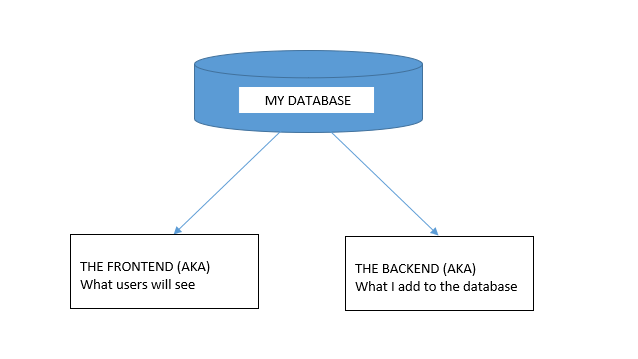
Now here’s where the exciting stuff begins, mapping things out.


I don’t see this done/encouraged often enough. Feel free to grab a piece of paper to logically map out your steps or produce a rough draft of where you’d like this project to go.

In this tutorial, I would like to achieve the following:


DB, DB, Set up your DB.


This requires a bit of planning but let’s start of with the basic structure we need to see this through.

We are going to need a user table and a content table and are a few ways to tackle this.

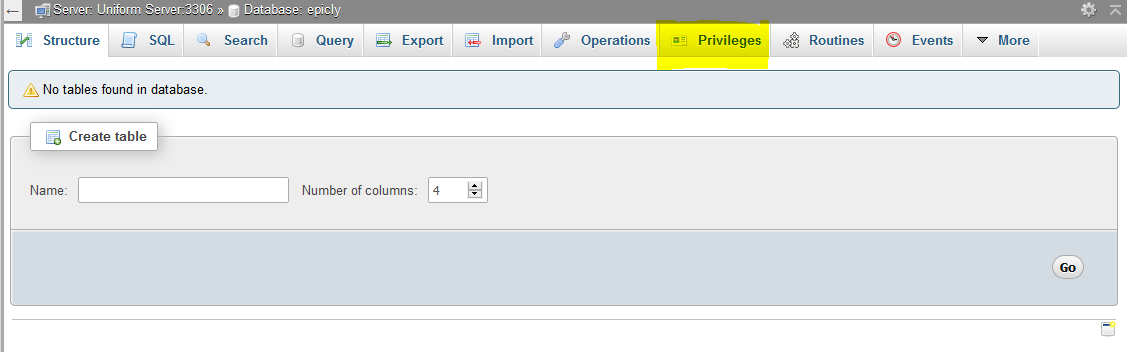
If you’re using the PHPMyAdmin tool you can create your database, add user permissions (Click on Permissions after creating your database), and create a table with ease.


If you’re like me and prefer to look at good ‘ol SQL then writing an SQL statement is the preferred approach.


CREATE TABLE <code>mydbname</code>.<code>content</code> ( <code>ID</code> INT(11) NOT NULL AUTO_INCREMENT , <code>title</code> VARCHAR(100) NOT NULL , <code>content</code> LONGTEXT NOT NULL , <code>author</code> VARCHAR(50) NOT NULL , PRIMARY KEY (<code>ID</code>)) ENGINE = MyISAM COMMENT = 'content table';

Understanding the SQL statement

In a nutshell we are creating a table with important fields. Namely:

####

ID | Title | Content | Author

#######

The ID field is our unique identifier.Now we can move on to the file structure.

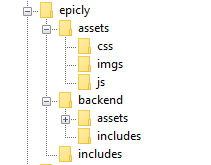
Everything has a place in the file structure game


You can use a structure that speaks to your coding style / memory.

I tend to use the following:


Choose a name for your CMS, which should be placed at the webroot of your localhost/server.

Replicate the folder structure as per the above example.

Next, we’re going to create a basic connection file.


You can create a conn.php file in your root/includes folder.

The connection file will provide crucial information to connect to the database.

Type the following into your conn.php file, remember to include your own database credentials.


<?php

$letsconnect = new mysqli("localhost","dbuser","dbpass","dbname");

?>


Let’s go to the homepage (index.php)


Create a file called index.php at the root of your CMS folder.

I will be adding comments in my code to help you understand what each line does.

Comments are a useful tool for developers to add important notes private to their code.

We need to pull information from the database so it’s imperative that we include our connection file.


<?php

include('includes/conn.php');

if ($letsconnect -> connect_errno) { echo "Error " . $letsconnect -> connect_error;

}else{

$getmydata=$letsconnect -> query("SELECT * FROM content");

foreach($getmydata as $mydata){ echo "Title: "; echo $mydata['title']; echo "<br/>"; echo "Content: "; echo $mydata['content']; echo "<br/>"; echo "Author: "; echo $mydata['author']; echo "<br/>"; echo "<br/>";

}

}

$letsconnect -> close();

?>


Let’s get a (very) basic backend up and running


Create a file called index.php in your backend folder.

We need to create a basic form to capture our data.

Let’s code some HTML!


<html>

<head><title>Backend - Capture Content</title></head>

<body>

<form action="<?php $_SERVER[‘PHP_SELF’];?>" method="post">

<input type="text" name="title" placeholder="Content Title here" required/>

<textarea name="content">Content Here</textarea>

<input type="text" name="author" placeholder="Author" required/>

<input type="submit" value="Save My Data" name="savedata"/>

</form>

</body>

</html>


Next, we need to process the form data.


Type the following just above the
<form> 
tag.


<?php

if(isset($_POST['savedata'])){

include('../includes/conn.php');

if ($letsconnect->connect_error) {

die("Your Connection failed: " . $letsconnect->connect_error);

}else{

$sql = "INSERT INTO content(title,content,author)VALUES ('".$_POST["title"]."', '".$_POST["content"]."', '".$_POST["author"]."')";

if (mysqli_query($letsconnect, $sql)) {

echo "Your data was saved successfully!";

} else { echo "Error: " . $sql . "" . mysqli_error($letsconnect);

} $letsconnect->close();

}

}

?>


Note, this is a basic MySQL query to insert data. However, before using this in production it's important to add proper escaping and security to prevent SQL injections. This will be covered in the next article.


Congrats you made it to the end of tutorial 1!


Test out your creation, modify your content, and play around.

Go to your sitename/index.php to see your frontend after capturing data via sitename/backend/index.php

Next Up:


codewithme Now With Security, Functionality, and Aesthetics in mind.


Conclusion


Coding doesn’t have to be daunting and it’s my aim to divide a complex system into bitesized tutorials so you can truly use the knowledge you’ve acquired in your own projects.
11760 views · 5 years ago


Welcome back!, if you’re new please be sure to read Part 1 here.


This tutorial will focus primarily on Security and will touch on how to plan functionality.

Planning out an application and seeing progress regularly is a good strategy as you are most likely to complete your tasks in a timely fashion with this approach.

Ready?, ok let’s jump into it!

DISCLAIMER


We highly recommend that you follow these tutorials on a localhost testing server like Uniserver. Read through Part 1 here to look at our recommendations. These tutorials follow a phased approach and it is highly recommended that you do not make snippets of code live prior to completing this tutorial series.
Where we left off – the serious stuff.


In the previous tutorial we saved variables to the database.

It’s important to note that further steps are needed to ensure that data transactions to / from the database are secure.

A great first step is to ensure that all POST data (data transmitted after a user clicks a form’s submit button) is sanitized.

What we’re trying to prevent


One of the most common exploits is SQL Injection, an attack most commonly used to insert SQL into db queries. POST data that’s not sanitized leaves a huge security hole for malicious exploits. In some cases SQL injection can be leveraged to rage an all out assault on a server’s operating system.

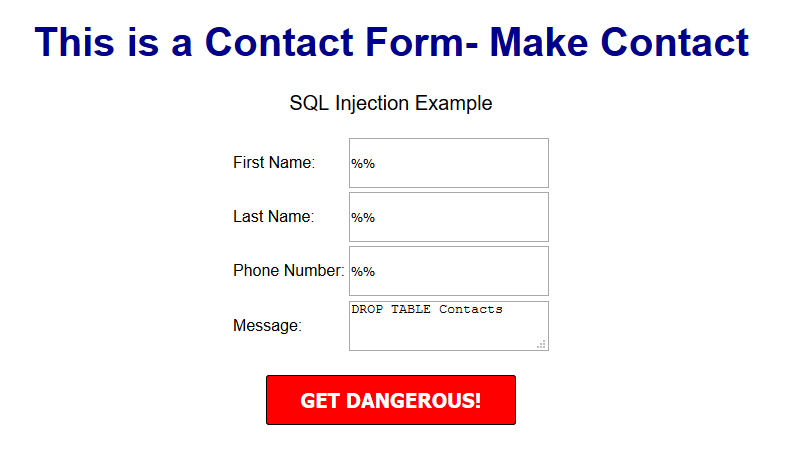
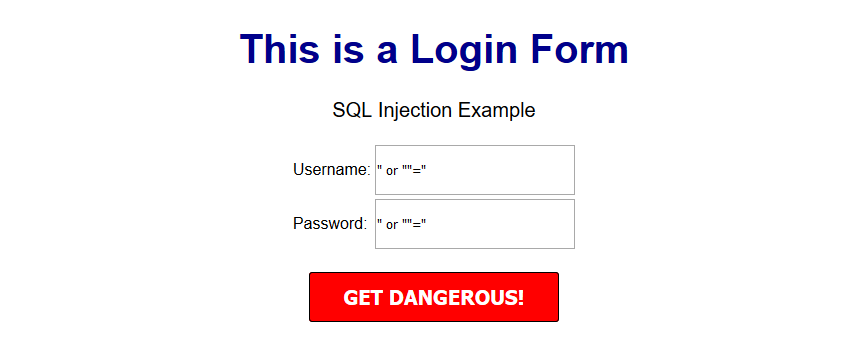
A few examples of a basic version of what this might look like can be seen below.


OUTCOME


This might delete your database table


OUTCOME


This might provide access to the entire user table and the password protected area/dashboard.


***Please note that there are various types of SQL injection techniques and I will delve into this during the course of this series.***


So what exactly is sanitization and what does it do?


When sanitizing POST data, we are essentially looking for any special characters that are often used in SQL injection attacks.

In many ways, this tiny piece of code is the unsung superhero of many database driven applications.

Let’s secure that POST data!


Navigate to your backend folder and open index.php

Locate the following line of code:

$sql = "INSERT INTO content(title,content,author)VALUES ('".$_POST["title"]."', '".$_POST["content"]."', '".$_POST["author"]."')";


Ok, let’s get to work.

Based on what I mentioned a few moments ago, it’s clear that our SQL statement is vulnerable so we need to sanitize the POST data pronto!

The method I will focus on first is $mysqli->real_escape_string. This will escape any special characters found in the POST data.

Add the following just above your $sql.

$title = $letsconnect -> real_escape_string($_POST['title']);

$content = $letsconnect -> real_escape_string($_POST['content']);

$author = $letsconnect -> real_escape_string($_POST['author']);


Did you notice the use of $letsconnect? This was used because of our db connection defined in conn.php.

Our new query will look like this:

$sql = "INSERT INTO content (title,content,author) VALUES ('".$title."', '".$content."', '".$author."')";


Go ahead and replace the old $sql.

Phew!, we can breathe easy now.

Next, let’s lighten things up a bit by focusing on functionality and aesthetics.


A phased approach is the best way to tackle projects of any size.

I tend to jot this down on paper before creating a more legible professional spec!.

Typically the phased approach lends itself to logical progression.

For example, over the next several days I will go over the following:

* Account Access
* The login process
* The registration process
* The password recovery process
* Frontend
* The look and feel
* Menus
* Sidebars
*Main Content
*Footer
* Backend
* Content Management
* Add/Edit/Delete
* Security

This will give us a good springboard to delve into more complex functionality.

The aesthetic I have in mind will be barebones at first with clean CSS practices (this will make life a whole lot easier when we have to make changes down the line!).

Challenge :


Plan out your own CMS, think about the user interface and design choices you’d like to implement, and create a phased approach.

Conclusion


I hope this tutorial encouraged you to think about security and understand one of the most common exploits. During the course of this series, you will receive the tools necessary to beef up security while maintaining your sanity!

Next up


CodeWithMe – Let’s go templating.
11122 views · 1 years ago


In modern software architecture, developers are constantly exploring new paradigms to enhance the performance, scalability, and maintainability of their applications. One such architectural pattern gaining popularity is Command Query Responsibility Segregation (CQRS). CQRS separates the responsibility of handling read and write operations, offering numerous benefits in complex systems. In this article, we'll delve into CQRS and explore its implementation in PHP.

What is CQRS?


CQRS, coined by Greg Young, is an architectural pattern that segregates the responsibility for handling read and write operations in a system. In traditional CRUD-based architectures, the same model is often used for both reading and writing data. However, CQRS advocates for a clear distinction between commands (write operations that modify state) and queries (read operations that retrieve data).

Key Concepts of CQRS:
   

. Command: Commands represent actions that modify the state of the system. They encapsulate the intent to perform an operation, such as creating, updating, or deleting data.
   
. Query: Queries retrieve data from the system without modifying its state. They are read-only operations used to fetch information for presentation or analysis.
   
. Command Handler: Responsible for processing commands by executing the necessary business logic and updating the system's state accordingly.
   
. Query Handler: Handles queries by retrieving data from the appropriate data source and returning the results to the caller.
   
. Separate Models: CQRS often involves maintaining separate models for commands and queries. This allows each model to be optimized for its specific use case, leading to improved performance and scalability.

Implementing CQRS in PHP:


Implementing CQRS in PHP involves structuring your application to separate command and query responsibilities effectively. Here's a high-level overview of how to implement CQRS in PHP:

1. Define Commands and Queries:


Start by defining the commands and queries your application will support. Commands should encapsulate actions that modify state, while queries should retrieve data.

class CreateProductCommand {
public $name;
public $price;
}

class GetProductQuery {
public $productId;
}


2. Create Command and Query Handlers:


Next, implement handlers for processing commands and queries. Command handlers execute the necessary business logic to fulfill the command, while query handlers retrieve data based on the query criteria.

class CreateProductCommandHandler {
public function handle(CreateProductCommand $command) {
}
}

class GetProductQueryHandler {
public function handle(GetProductQuery $query) {
}
}


3. Use Separate Models:


Maintain separate models for commands and queries to optimize each for its specific purpose. This separation allows you to design models tailored to the needs of write and read operations.

class Product {
public $name;
public $price;
}

class ProductView {
public $name;
public $price;
}


4. Wiring Everything Together:


Finally, wire up your command and query handlers to the appropriate endpoints or controllers in your application. Dispatch commands to their respective handlers and invoke query handlers to retrieve data.

$command = new CreateProductCommand();
$command->name = "Example Product";
$command->price = 99.99;

$handler = new CreateProductCommandHandler();
$handler->handle($command);

$query = new GetProductQuery();
$query->productId = 123;

$handler = new GetProductQueryHandler();
$product = $handler->handle($query);


Benefits of CQRS in PHP:


-Improved Scalability: Separating read and write operations allows you to scale each independently based on demand.

-Enhanced Performance: Optimizing models and handlers for specific tasks can lead to improved performance and responsiveness.

-Simplified Maintenance: Clear separation of concerns makes the codebase easier to understand, maintain, and extend over time.

-Flexibility: CQRS enables flexibility in choosing the most suitable data storage and retrieval mechanisms for different use cases.

Conclusion:


CQRS is a powerful architectural pattern that offers numerous advantages for building complex and scalable PHP applications. By segregating command and query responsibilities, developers can achieve better performance, scalability, and maintainability in their systems. While implementing CQRS in PHP requires careful planning and design, the benefits it provides make it a compelling choice for projects requiring high performance and flexibility.

SPONSORS