
PHP & Web Development Blogs

Search Results For: service
Showing 1 to 5 of 16 blog articles.
51542 views · 2 years ago


To bridge the gap between web-based and cloud-based applications, businesses often rely on skilled DevOps developers. These professionals play a crucial role in ensuring seamless integration, efficient customization, and robust back-end infrastructure for applications. The expertise of DevOps developers is indispensable for optimizing development workflows and enhancing collaboration between development and operations teams in the dynamic landscape of app development services.

In the realm of cloud computing, web based application in cloud computing play a pivotal role. Technically, web apps, as the name suggests, are applications hosted on remote servers & accessible through web browsers. On the other hand, cloud-based apps are web applications that come with advanced functionalities & elaborate compatibility.


In the realm of contemporary software development, the demand for innovative solutions is evident in the competition between web and cloud-based applications. These two platforms share similarities but diverge significantly in crucial aspects. This article will delve into the distinctions between web-based and cloud-based applications, exploring facets such as back-end infrastructure, scalability, and technical perspectives, shedding light on the nuances that developers navigate in this dynamic landscape, including the pivotal role of technologies like chatbot development.
What Is a Web Application?

A web-based app is an application designed and developed for the web browser. Unlike cloud based application development, the web app completely depends on the web server for functionality & processing. This application program is mainly stored on the remote server & delivered through a web browser interface over the internet. According to web application development company, web apps have client-server architecture & their codes are divided into 2 major components – server-side architecture & client-side architecture.

Server-side architecture: The server-side architecture or script usually deals with data processing. The web server can process a client request & send a response back. This web app architecture defines a simultaneous interaction between database instances, components, user interfaces, middleware systems, and servers.

Client-side architecture: The client-side architecture mainly deals with interface functionalities such as drop-down boxes and buttons. When a user clicks on the link, the browser will start loading the client-side script & rendering a text and graphic element for interaction.
Types of Web Apps
Nowadays, many businesses are already adopting various kinds of web-based applications because of their several advantages, features, and functionalities. 8 most popular types of web apps include:
    . Static Web Apps
Static web applications, constructed using HTML, CSS, and JavaScript, lack the flexibility of dynamic counterparts. These web based services provide content directly to users without requiring server-side modifications, resulting in simplicity and straightforward development. Key benefits of these apps include:
Very fast load time
Highly secure
Less complex to build
    . Dynamic Web Apps
This is a complex type that provides real-time data based on the server response and the user’s request. Dynamic web apps can be developed either as a conventional website with several pages and levels of navigation or as a single-page web application. They use several server-side and client-side languages to create web pages such as HTML, CSS, JavaScript, Python, PHP, Ruby, etc. Key benefits of dynamic web apps include:
Wider audience reach
Scalable in comparison to static web apps
Very flexible in terms of a new content update
    . Single Page Apps
A single page web app entirely runs on the browser & never requires browser reloading. This is actually a dynamic web app that manages all data on a single HTML page. This type of web app is faster than traditional websites as its logic is implemented in the browser directly than a server. Gmail, Netflix, Pinterest & Paypal are the best examples of single page applications. Key benefits include:
Enhanced user experience
Minimized server load
Improved app performance
    . Multiple-Page Apps
Multiple page apps are designed multiple pages separately and combined to form a website. They have different pages with static information like texts & images. Web based app development companies recommend using multiple-page apps as they offer excellent control over search engine optimization techniques. Major benefits of Multiple page apps include:
Ideal for SEO
Quick browser back or forward navigation
Simple to develop
    . Animated Web Apps
This is a type of web application that effectively supports synchronization & animation on the web platform. These applications are widely used by freelancers and creative companies to present their creativity better. Technically, JavaScript, HTML5, FLASH, and CSS are used to create animated web applications. Key benefits of AWAs include
Improved User Engagement
Enhanced Navigation
Excellent Branding
    . Web Apps with CMS
In this web application, content is updated constantly. It helps to manage, modify and create digital content with ease. WordPress is one of the best examples of CMS web applications. A variety of languages are used to create content management systems such as C#, PHP, Java, and Python. Key advantages of CMS web apps include:
Quick content creation & management
Efficient & quick updates
A vast range of features
    . E-commerce Web Apps
It’s a complicated and advanced dynamic web application that allows users to buy & sell goods electronically. These web based services encompass transaction and payment integration as key components, facilitating seamless order processing, payment acceptance, and logistical management for businesses involved in online commerce. Key benefits of these web apps include:
Scale business quickly
Offers customer insights through tracking & analytics
Sell goods across the world
    . Progressive Web Apps
Progressive web apps or PWAs are also called cross-platform web apps usually built with HTML, CSS, & JavaScript. PWAs use different features, APIs, and progressive methods to deliver a seamless experience. Progressive web apps boost the adaptability and speed of web applications. These apps are still easy to access if internet connectivity is poor. Key benefits of progressive web apps include:
Fast loading time
No installation required
Quickly respond to user interactions
Enhanced cross-platform conversion

Looking for App Development Solutions?
Take your brand up a notch with our custom mobile app development services.
Talk to an Expert

Type
Widely Used In
Advantages
Dynamic web apps
Social media
Healthcare
IT Industry
Logistics and transportations
Retail and ecommerce sectors
On-demand
Directly manage websites to update & change the information
Quick user management to protect servers & control all website users
Static web apps
Book publishing sectors
Works in offline mode
No 3rd party software installation required to access web apps
Single page apps
Email service
Communication sectors
Allows navigation & optimized routing experience
Keeps visual structure of web apps consistently through presentation logic
Multiple page apps
E-commerce sectors
Enterprise industries
Enables optimizing every page for the search engine
Allows users to access other pages
Animated web apps
Animation
Education
Gaming industries
Hold user attention for a very long time due to its attractive approach & unique design
Aspect ratios, landscape orientations, portrait, and viewing distances & different pixel densities are considered
Web apps with CMS
Blogging platforms
Sales & marketing platform
News portals
Easily organizes the web content Offers group & user functionality
Simple language support & integration
E-commerce web apps
E-commerce sectors
Allows sellers to sell products using a single platform
Helps you expand business globally & reach maximum audience
Progressive Web Apps
On-demand
Healthcare
Retail and e-commerce
Logistics and transportations
Social media
IT sectors
Responsive & Browser Compatibility Works in online & offline mode
Updates with no user interaction

Key Benefits of Web Apps
Web apps enable businesses to interact with their customers more efficiently. These applications can make it easy to track & measure data that are essential to keep business operations streamlined. Key advantages of web apps include:
Easily accessible through any kind of web browser
Runs on multiple platforms that make it cross-platform compatible
Minimizes the risk of compatibility issues
Requires less maintenance & support from the developer’s end
Helps to ease usability for the customers
Effectively eliminates hard drive space limitations
Apps can be maintained & updated without software reinstallation on several devices
Offers high scalability and flexibility
Simple to deploy, maintain, and update
The cost of routine maintenance is minimized as the data is stored on remote servers
What is a Cloud Based App?
These apps are online software programs with elements accessible via a local server and executed on the cloud environment. As internet-based software, cloud applications are stored in the remote data center & handled by cloud-service providers. These apps are used for file sharing & storage, order entry, word processing, inventory management, financial accounting, customer relationship management, data collection, etc.

According to the report, the global market size of cloud apps is projected to reach approx 168.6 billion USD by 2025. Cloud apps usually support several user requirements through customization and provide several services to meet storage, backup & security needs. Some major characteristics of cloud apps include:
Agile application
Microservices-oriented
API-backed
Continuously integrated & delivered
DevOps-enabled
Analytics-infused
User experience-centric
Types of Cloud-based Applications
Cloud apps are divided into three major cloud computing models – SaaS, PaaS, and IaaS. Each model also shows several parts of cloud computing stacks. Take a closer look at these types:
    . SaaS or Software as a Service
SaaS is one of the best cloud apps that enable users to easily access full-functioning software applications over the internet. These cloud applications are primarily designed for freelance services, large enterprises & SMBs. Some of the best examples of SaaS applications are HubSpot CRM, Wrike, MS Office 365, Sisense, Wix, etc.
    . PaaS or Platform as a Service
PaaS provides users with the infrastructure, computing platforms, and solutions to build their own applications. Platform as a Service is ideal for businesses that mainly engage in collaboration, testing, and development of cloud solutions. PaaS applications have a deployment environment including run-time system libraries, operating systems, and graphic UI. Some of the best examples of PaaS apps are Google App Engine, Microsoft Azure, Rackspace Cloud Sites, etc.
    . IaaS or Infrastructure as a Service
IaaS consists of basic building blocks that offer access to networking functionalities, features & data storage space. It enables users to outsource IT infrastructures like servers, processing, virtual machines, storage, networking & other resources. IaaS applications also offer a good level of management control and flexibility over IT resources. Some of the best examples of IaaS apps are Amazon WorkSpaces, IBM Cloud, Google Cloud, etc.
Benefits of Cloud Apps
Web based application in cloud computing boost productivity, accessibility, security, and data safety. They help businesses make the process of collaboration more effective and easier. Key benefits of cloud applications include:
Minimal service provider interaction & management effort
Provides large computing capabilities, online & offline
Provides access to information from any device or place
Offers fast access to important applications through cloud servers
The performance of the availability of cloud apps enhances profitability & streamlines workflows
Serves multiple consumers with virtual and physical needs
Provides high transparency to resource providers & consumers
Offers improved collaboration options
Web Apps Vs Cloud Apps – Key Differences
Web apps and cloud apps both come with a wide range of functionalities & have noticeable distinctions. Web-based applications usually are accessible via web browsers, whereas cloud app’s infrastructure and data aren’t only accessible through the web browser but also downloadable. So, all cloud apps are web apps with additional features. Other differences between web and cloud apps are listed below.

Parameters
Cloud apps
Web apps
Internet
Work partially or entirely without the internet connectivity
Work with the internet only
Security
Ensures high security measures for sensitive & confidential information
It can verify client info on authentic servers
Technology
It needs a back–end framework & a JavaScript-based structure like React Js, Angular, etc
It has inbuilt languages such as PHP, Python & Ruby, and databases like MySQL.
Access
It’s not dependent on the web browser
Accessed via the web browser only
Customization
Customization features improve functionalities.
Never provides customization and similar functionalities
Costs
Expensive as compared to web apps
Development cost is less than cloud apps
Types
SaaS, PaaS, IaaS, RaaS
Static web apps, dynamic web apps portal web apps, etc
Scalability
Inherently scalable
Limited scalability
Availability
High uptime
Limited uptime
Storage
Multiple replicated center
Single data center

Are You In Search of The Best App Development Company?
With top-notch development services, we develop the best software applications that meet your needs.
Book an Appointment
Final Words
Web apps and cloud apps both are continuing to deliver users as the most crucial touch point. Since they are packed with similarities and dissimilarities in terms of software architecture, storage, and other aspects, selecting the right application always depends on customer preferences, business needs, and operations. Are you planning to build a custom web application or looking for web app development services? Get in touch with our experts for complete assistance.

30253 views · 7 years ago
Making Charts and Graphs using Laravel

Installing composer

Composer is a package management tool for PHP. Laravel requires composer for installation. We can download composer from https://getcomposer.org/download/

After installation that you can test whether composer installed or not by command
composer

Installing Laravel

The current stable version of laravel is laravel 5.6. We can install laravel package with three ways.

In command prompt or terminal by running composer global require "laravel/installer" and then Laravel new

or

We can create the project with Composer by running composer create-project --prefer-dist laravel/laravel

or

Directly clone from github
git clone https://github.com/laravel/laravel/tree/master and after that composer update

Laravel local development server

Run the below command in command prompt or terminal
PHP artisan serve


Above command will start to local development servehttp://localhost:8000 or if you want to change default port:

php artisan serve --port 


Generating charts and graphs

We are using consoletvs package for generating charts. So for installation we can first move inside to our project using command prompt or terminal. We are following the below steps to install

Step 1:

First we need to install ConsoleTVs/Charts composer package inside our laravel project.
composer require consoletvs/charts


Step 2:

After successfully installation of above package, open app/config.php and add service provider.
In config/app.php


'providers' => [
....
ConsoleTVs\Charts\ChartsServiceProvider::class,
],


After the service provider we need to add alias
'aliases' => [
....
'Charts' => ConsoleTVs\Charts\Facades\Charts::class,
]


Step 3

We need to configure of database for application. We can configure in either .env file or config/database.php file.


Step 4

We can migrate our default tables that is user. We can find the table in database/migration folder.

Step 5

We can generate dummy records for demo in users table. For creating dummy records, we need to run the below command in command prompt or terminal
php artisan tinker>>> factory(App\User::class, 20)->create();

the above command will create a set of 20 records.

If we need to add more records we need to run the above command or we can increase the count as much as we want. For example
php artisan tinker>>> factory(App\User::class, 2000)->create();


Step 6Creating controller

For creating controller we need to run below command in terminal or command prompt
php artisan make controller:<controller_name>


Step 7Adding the routes

We can add the routes for navigating our application. You can find routes file inside routes folder. Before 5.4 we can find routes.php file itself, now its web.php. If you are using laravel 5.2 routes.php will inside app/http folder.

So inside web.php:

Route::get('create-chart/{type}','ChartController@makeChart');


Here type will be the parameter we are passing and it will focus to makeChart() function inside chartcontroller

Step 8

Import charts to controller, for that in the namespace section add:

Use charts;


Step 9

We can put the below code into chartController

public function makeChart($type)
{
switch ($type) {
case 'bar':
$users = User::where(DB::raw("(DATE_FORMAT(created_at,'%Y'))"),date('Y'))
->get();
$chart = Charts::database($users, 'bar', 'highcharts')
->title("Monthly new Register Users")
->elementLabel("Total Users")
->dimensions(1000, 500)
->responsive(true)
->groupByMonth(date('Y'), true);
break;
case 'pie':
$chart = Charts::create('pie', 'highcharts')
->title('HDTuto.com Laravel Pie Chart')
->labels(['Codeigniter', 'Laravel', 'PHP'])
->values([5,10,20])
->dimensions(1000,500)
->responsive(true);
break;
case 'donut':
$chart = Charts::create('donut', 'highcharts')
->title('HDTuto.com Laravel Donut Chart')
->labels(['First', 'Second', 'Third'])
->values([5,10,20])
->dimensions(1000,500)
->responsive(true);
break;
case 'line':
$chart = Charts::create('line', 'highcharts')
->title('HDTuto.com Laravel Line Chart')
->elementLabel('HDTuto.com Laravel Line Chart Lable')
->labels(['First', 'Second', 'Third'])
->values([5,10,20])
->dimensions(1000,500)
->responsive(true);
break;
case 'area':
$chart = Charts::create('area', 'highcharts')
->title('HDTuto.com Laravel Area Chart')
->elementLabel('HDTuto.com Laravel Line Chart label')
->labels(['First', 'Second', 'Third'])
->values([5,10,20])
->dimensions(1000,500)
->responsive(true);
break;
case 'geo':
$chart = Charts::create('geo', 'highcharts')
->title('HDTuto.com Laravel GEO Chart')
->elementLabel('HDTuto.com Laravel GEO Chart label')
->labels(['ES', 'FR', 'RU'])
->colors(['#3D3D3D', '#985689'])
->values([5,10,20])
->dimensions(1000,500)
->responsive(true);
break;
default:
break;
}
return view('chart', compact('chart'));
}


Step 10

Create a blade file. Blade is the view file used inside the laravel. You can add new blade file with any name with an extension of .blade.php
Here we are creating chart.blade.php

<!DOCTYPE html>
<html lang="en">
<head>
<meta charset="utf-8">
<meta http-equiv="X-UA-Compatible" content="IE=edge">
<meta name="viewport" content="width=device-width, initial-scale=1">
<title>My Charts</title>
{!! Charts::styles() !!}
</head>
<body>

<div class="app">
<center>
{!! $chart->html() !!}
</center>
</div>

{!! Charts::scripts() !!}
{!! $chart->script() !!}
</body>
</html>


Step 11

We can run our laravel application in local development server by php artisan serve command:

http://localhost:8000/create-chart/bar
http://localhost:8000/create-chart/pie
http://localhost:8000/create-chart/donut
http://localhost:8000/create-chart/line
http://localhost:8000/create-chart/area
http://localhost:8000/create-chart/geo



In the above example we was creating line chart, geo chart, bar chart, pie chart, donut chart, line chart and area chart. We can also create gauge chart, progressbar chart, areaspline chart, scatter chart, percentage chart etc using consoletvs charts composer package.

There are a lot of jQuery libraries also available like amcharts, chartjs, highcharts, google, material, chartist, fusioncharts, morris, plottablejs etc. However, using this plugin we can easily create charts without having to use jQuery, another advantage to building it in with Laravel.
25459 views · 4 years ago
Is PHP a dying language

It seems like this question gets asked every year, as for some reason the perception surrounding PHP is that it is a language used by hobbyists, or a dying language - a programming language on its way out.

Before we take a look at "is PHP being used less," let's start with some critical points to consider when choosing a programming language to learn/ invest in.

PHP powers ~80% of the web


The first point is how popular PHP is as a program language. Recently in a podcast a debate around PHP was raised, with the question being is it an "enterprise" language. The argument against PHP is that it is not widely adopted by enterprises for enterprise application development - or apps that are traditionally developed in Java or .Net.

The key here is understanding that every tool has its strengths and weaknesses, and there are times where using a compiled language such as Java is a smarter move than using PHP. As always, you want to choose the right tool for the job, and PHP as a programming language excels for web applications. That's why today it powers nearly 80% of the websites on the internet! I want to repeat that number, nearly 80% of websites on the internet!

In the podcast, after the initial argument that PHP was not an enterprise language, I had one question to ask - "can you name one enterprise that doesn't use PHP?" Despite the misconception that PHP is not an enterprise language, nearly every enterprise utilizes PHP in some fashion (many for their website, blog, or internal tools). While PHP may not power the app they offer as a service (although for many companies it does), it powers just as critical of offerings that help drive success for the company.

PHP made Yahoo, Facebook, and Tumblr possible


It's not just personal blogs running on a WordPress install, or small sites running on Drupal (btw, both of these power high traffic, well known web properties), but PHP actually makes development for the web easier and faster. Because it is not a compiled language and is designed to scale, companies are able launch faster, add new features as they go, and grow to enormous scale.

Some of the sites that started with PHP include Yahoo, Facebook, Tumblr, Digg, Mailchimp, and Wikipedia! But it's not just older platforms that started off and have grown to scale with PHP - Etsy, Slack, Baidu, Box, and Canva also got started with PHP! Read why Slack chose PHP

In fact, according to BuiltWith, PHP powers 53.22% of the top 10k websites!

Programming languages don't just disappear


Understanding the prevalence of PHP today, and how often it is used is critical to understanding the longevity of PHP. Despite the radicalized idea, programming languages (and thus programming jobs) do not just disappear overnight. Today you can still find jobs writing code used in mainframes - such as Fortran or Cobol.

As long as companies have applications that use PHP, they'll need someone who knows PHP to maintain the application. And with PHP actively being developed and maintained (PHP 8 having just been released), and PHP powerhouses like WordPress, Drupal, SugarCRM, and others powering websites and apps around the world, it's a safe bet PHP won't be going anywhere anytime soon.

But with the basics out of the way, let's look at how PHP has faired over the years.

PHP usage over the years


While there is no exact measurement that determines how programming languages are ranked, there are several different rankings we can look at to see how a language has evolved over the years, and where it ranks today.

GitHub's most popular programming languages


Every year GitHub releases a report of the most popular languages being used to create repositories on GitHub.com. While this isn't an exact way to quantify a programming language, it does help us understand what languages developers are using and promoting for their applications. It also helps us see how lively the community itself is.

In 2014, PHP was ranked as the 3rd most popular programming language, being beat out only by JavaScript and Java. With the emergence of Typescript, C# moving open source, and increased usage of Python for AI - PHP did drop - and was the 6th most popular programming language on GitHub for 2020.

PHP on GitHub over the years

PHP's ranking on the Tiobe index


Another index for software popularity is the Tiobe index, which bases their ratings off of the number of search engines for programming languages. This index is heavily relied on by companies when making programming and investment decisions, especially in developer marketing.

Like with GitHub, PHP has also seen a decline in the Tiobe index. Ranked 8th last year for all languages, PHP dropped to 9th place, being outranked by the C languages (C, C#, C++), Java, Visual Basic, Python, JavaScript, and Assembly. However, to put the rankings in contrast, PHP is 9th out of the 274 languages Tiobe tracks, and bests SQL, Ruby, Groovy, Go, and Swift.

You can see the latest Tiobe index (updated monthly) at: https://www.tiobe.com/tiobe-index/

PHP's ranking on BuiltWith


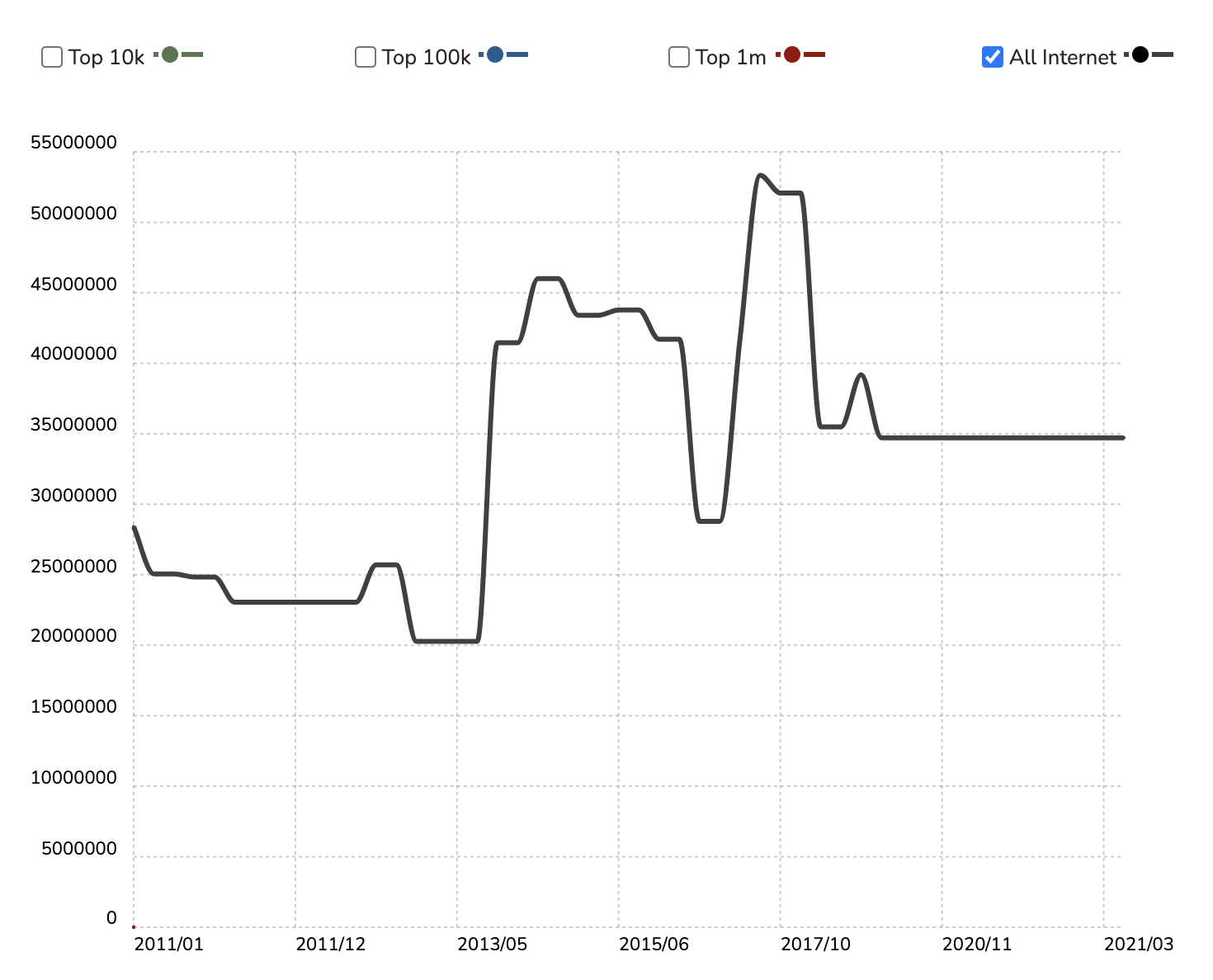
The last model we'll look at is BuiltWith. BuiltWith scans website headers to determine what a website is powered by, and like GitHub and Tiobe provides a ranking of programming language popularity and trends.

Builtwith provides an interesting perspective in that we can see an explosion of sites being built with PHP (nearly tripling from 2013 to 2016) before dropping and normalizing in 2017. From 2017 to present, the number of sites using PHP has remained almost constant.

BuiltWith PHP Usage

This suggests (as with what we've seen with GitHub and Tiobe) that other languages have grown in popularity, such as JavaScript and Node.js. This doesn't mean that PHP is no longer being used or relied or, but rather that there is more competition and that there are other viable options whereas PHP stood alone at times in terms of being the goto language for web development.

Indeed, when we look at how PHP ranks amongst all technologies on BuiltWith, PHP receives the following BuiltWith awards:

• The most popular on the Entire Internet in Frameworks category.

• The most popular in the Top 10k sites in Frameworks category.

• The most popular in the Top 100k sites in Frameworks category.

• The most popular in the Top 1 Million sites in Frameworks category.

Conclusion


PHP's popularity has dropped from its height 10 years ago, however it still remains the most popular programming language powering the web. It's important to remember that every tool has pros and cons, and some of the bad rap PHP gets is when compared to languages designed to accomplish tasks or build programs that PHP was never designed to.

It's also important to remember a lot of early criticism for PHP came from it being a procedural programming language and not encompassing Object Oriented Programming capabilities. These capabilities were added in PHP 4 and with PHP 7 & 8 OOP has become a staple of the PHP language.

PHP is a viable, powerful language used by nearly every enterprise and many businesses large and small. In fact it powers over 50% of the top 10,000 websites on the web! With such large usage, popular tools such as WordPress, and an active community, it is safe to assume that PHP will remain a prominent language for years to come.
23592 views · 7 years ago
Creating a PHP Daemon Service

What is a Daemon?

The term daemon was coined by the programmers of Project MAC at MIT. It is inspired on Maxwell's demon in charge of sorting molecules in the background. The UNIX systems adopted this terminology for daemon programs.

It also refers to a character from Greek mythology that performs the tasks for which the gods do not want to take. As stated in the "Reference System Administrator UNIX", in ancient Greece, the concept of "personal daemon" was, in part, comparable to the modern concept of "guardian angel." BSD family of operating systems use the image as a demon's logo.

Daemons are usually started at machine boot time. In the technical sense, a demon is considered a process that does not have a controlling terminal, and accordingly there is no user interface. Most often, the ancestor process of the deamon is init - process root on UNIX, although many daemons run from special rcd scripts started from a terminal console.

Richard Stevenson describes the following steps for writing daemons:
    . Resetting the file mode creation mask to 0 function umask(), to mask some bits of access rights from the starting process.
    . Cause fork() and finish the parent process. This is done so that if the process was launched as a group, the shell believes that the group finished at the same time, the child inherits the process group ID of the parent and gets its own process ID. This ensures that it will not become process group leader.
    . Create a new session by calling setsid(). The process becomes a leader of the new session, the leader of a new group of processes and loses the control of the terminal.
    . Make the root directory of the current working directory as the current directory will be mounted.
    . Close all file descriptors.
    . Make redirect descriptors 0,1 and 2 (STDIN, STDOUT and STDERR) to /dev/null or files /var/log/project_name.out because some standard library functions use these descriptors.
    . Record the pid (process ID number) in the pid-file: /var/run/projectname.pid.
    . Correctly process the signals and SigTerm SigHup: end with the destruction of all child processes and pid - files and / or re-configuration.

How to Create Daemons in PHP

To create demons in PHP you need to use the extensions pcntl and posix. To implement the fast communication withing daemon scripts it is recommended to use the extension libevent for asynchronous I/O.

Lets take a closer look at the code to start a daemon:
umask(0);
$pid = pcntl_fork(); 
if ($pid < 0) {
print('fork failed');
exit 1;
}


After a fork, the execution of the program works as if there are two branches of the code, one for the parent process and the second for the child process. What distinguishes these two processes is the result value returned the fork() function call. The parent process ID receives the newly created process number and the child process receives a 0.
if ($pid > 0) { echo "daemon process started
";
exit; }

$sid = posix_setsid(); if ($sid < 0) {
exit 2;
}

chdir('/'); file_put_contents($pidFilename, getmypid() );
run_process();


The implementation of step 5 "to close all file descriptors" can be done in two ways. Well, closing all file descriptors is difficult to implement in PHP. You just need to open any file descriptors before fork(). Second, you can override the standard output to an error log file using init_set() or use buffering using ob_start() to a variable and store it in log file:
ob_start();
var_dump($some_object);
$content = ob_get_clean();
fwrite($fd_log, $content); 


Typically, ob_start() is the start of the daemon life cycle and ob_get_clean() and fwrite() calls are the end. However, you can directly override STDIN, STDOUT and STDERR:
ini_set('error_log', $logDir.'/error.log');
fclose(STDIN); 
fclose(STDOUT);
fclose(STDERR);
$STDIN = fopen('/dev/null', 'r');
$STDOUT = fopen($logDir.'/application.log', 'ab');
$STDERR = fopen($logDir.'/application.error.log', 'ab');


Now, our process is disconnected from the terminal and the standard output is redirected to a log file.

Handling Signals

Signal processing is carried out with the handlers that you can use either via the library pcntl (pcntl_signal_dispatch()), or by using libevent. In the first case, you must define a signal handler:
function sig_handler($signo)
{
global $fd_log;
switch ($signo) {
case SIGTERM:
fclose($fd_log); unlink($pidfile); exit;
break;
case SIGHUP:
init_data(); break;
default:
}
}

pcntl_signal(SIGTERM, "sig_handler");
pcntl_signal(SIGHUP, "sig_handler");


Note that signals are only processed when the process is in an active mode. Signals received when the process is waiting for input or in sleep mode will not be processed. Use the wait function pcntl_signal_dispatch(). We can ignore the signal using flag SIG_IGN: pcntl_signal(SIGHUP, SIG_IGN); Or, if necessary, restore the signal handler using the flag SIG_DFL, which was previously installed by default: pcntl_signal(SIGHUP, SIG_DFL);

Asynchronous I/O with Libevent

In the case you use blocking input / output signal processing is not applied. It is recommended to use the library libevent which provides non-blocking as input / output, processing signals, and timers. Libevent library provides a simple mechanism to start the callback functions for events on file descriptor: Write, Read, Timeout, Signal.

Initially, you have to declare one or more events with an handler (callback function) and attach them to the basic context of the events:
$base = event_base_new();
$event = event_new();
$errno = 0;
$errstr = '';
$socket = stream_socket_server("tcp://$IP:$port", $errno, $errstr);
stream_set_blocking($socket, 0); event_set($event, $socket, EV_READ | EV_PERSIST, 'onAccept', $base);


Function handlers 'onRead', 'onWrite', 'onError' must implement the processing logic. Data is written into the buffer, which is obtained in the non-blocking mode:
function onRead($buffer, $id)
{
while($read = event_buffer_read($buffer, 256)) {
var_dump($read);
}
}


The main event loop runs with the function event_base_loop($base);. With a few lines of code, you can exit the handler only by calling: event_base_loobreak(); or after the specified time (timeout) event_loop_exit();.

Error handling deals with failure Events:
function onError($buffer, $error, $id)
{
global $id, $buffers, $ctx_connections;
event_buffer_disable($buffers[$id], EV_READ | EV_WRITE);
event_buffer_free($buffers[$id]);
fclose($ctx_connections[$id]);
unset($buffers[$id], $ctx_connections[$id]);
}


It should be noted the following subtlety: Working with timers is only possible through the file descriptor. The example of official the documentation does not work. Here is an example of processing that runs at regular intervals.
$event2 = event_new();
$tmpfile = tmpfile();
event_set($event2, $tmpfile, 0, 'onTimer', $interval);
$res = event_base_set($event2, $base);
event_add($event2, 1000000 * $interval);


With this code we can have a working timer finishes only once. If we need a "permanent" Timer, using the function onTimer we need create a new event each time, and reassign it to process through a "period of time":
function onTimer($tmpfile, $flag, $interval)
{
$global $base, $event2;

if ($event2) {
event_delete($event2);
event_free($event2);
}

call_user_function(‘process_data’,$args);

$event2 = event_new();
event_set($event2, $tmpfile, 0, 'onTimer', $interval);
$res = event_base_set($event2, $base);
event_add($event2, 1000000 * $interval);
}


At the end of the daemon we must release all previously allocated resources:
event_delete($event);
event_free($event);
event_base_free($base);

event_base_set($event, $base);
event_add($event);


Also it should be noted that for the signal processing handler is set the flag EV_SIGNAL: event_set($event, SIGHUP, EV_SIGNAL, 'onSignal', $base);

If needed constant signal processing, it is necessary to set a flag EV_PERSIST. Here follows a handler for the event onAccept, which occurs when a new connection is a accepted on a file descriptor:
function onAccept($socket, $flag, $base) {
global $id, $buffers, $ctx_connections;
$id++;
$connection = stream_socket_accept($socket);
stream_set_blocking($connection, 0);
$buffer = event_buffer_new($connection, 'onRead', NULL, 'onError', $id);
event_buffer_base_set($buffer, $base);
event_buffer_timeout_set($buffer, 30, 30);
event_buffer_watermark_set($buffer, EV_READ, 0, 0xffffff); event_buffer_priority_set($buffer, 10); event_buffer_enable($buffer, EV_READ | EV_PERSIST); $ctx_connections[$id] = $connection;
$buffers[$id] = $buffer;
}


Monitoring a Daemon

It is good practice to develop the application so that it was possible to monitor the daemon process. Key indicators for monitoring are the number of items processed / requests in the time interval, the speed of processing with queries, the average time to process a single request or downtime.

With the help of these metrics can be understood workload of our demon, and if it does not cope with the load it gets, you can run another process in parallel, or for running multiple child processes.

To determine these variables need to check these features at regular intervals, such as once per second. For example downtime is calculated as the difference between the measurement interval and total time daemon.

Typically downtime is determined as a percentage of a measurement interval. For example, if in one second were executed 10 cycles with a total processing time of 50ms, the time will be 950ms or 95%.

Query performance wile be 10rps (request per second). Average processing time of one request: the ratio of the total time spent on processing requests to the number of requests processed, will be 5ms.

These characteristics, as well as additional features such as memory stack size queue, number of transactions, the average time to access the database, and so on.

An external monitor can be obtain data through a TCP connection or unix socket, usually in the format of Nagios or zabbix, depending on the monitoring system. To do this, the demon should use an additional system port.

As mentioned above, if one worker process can not handle the load, usually we run in parallel multiple processes. Starting a parallel process should be done by the parent master process that uses fork() to launch a series of child processes.

Why not run processes using exec() or system()? Because, as a rule, you must have direct control over the master and child processes. In this case, we can handle it via interaction signals. If you use the exec command or system, then launch the initial interpreter, and it has already started processes that are not direct descendants of the parent process.

Also, there is a misconception that you can make a demon process through command nohup. Yes, it is possible to issue a command: nohup php mydaemon.php -master >> /var/log/daemon.log 2 >> /var/log/daemon.error.log &

But, in this case, would be difficult to perform log rotation, as nohup "captures" file descriptors for STDOUT / STDERR and release them only at the end of the command, which may overload of the process or the entire server. Overload demon process may affect the integrity of data processing and possibly cause partial loss of some data.

Starting a Daemon

Starting the daemon must happen either automatically at boot time, or with the help of a "boot script."

All startup scripts are usually in the directory /etc/rc.d. The startup script in the directory service is made /etc/init.d/ . Run command start service myapp or start group /etc/init.d/myapp depending on the type of OS.

Here is a sample script text:
#! /bin/sh
#
$appdir = /usr/share/myapp/app.php
$parms = --master –proc=8 --daemon
export $appdir
export $parms
if [ ! -x appdir ]; then
exit 1
fi

if [ -x /etc/rc.d/init.d/functions ]; then
. /etc/rc.d/init.d/functions
fi

RETVAL=0

start () {
echo "Starting app"
daemon /usr/bin/php $appdir $parms
RETVAL=$?
[ $RETVAL -eq 0 ] && touch /var/lock/subsys/mydaemon
echo
return $RETVAL
}

stop () {
echo -n "Stopping $prog: "
killproc /usr/bin/fetchmail
RETVAL=$?
[ $RETVAL -eq 0 ] && rm -f /var/lock/subsys/mydaemon
echo
return $RETVAL
}

case in
start)
start
;;
stop)
stop
;;
restart)
stop
start
;;
status)
status /usr/bin/mydaemon
;;
*)
echo "Usage:
php
if (is_file('app.phar')) {
unlink('app.phar');
}
$phar = new Phar('app.phar', 0, 'app.phar');
$phar->compressFiles(Phar::GZ);
$phar->setSignatureAlgorithm (Phar::SHA1);
$files = array();
$files['bootstrap.php'] = './bootstrap.php';
$rd = new RecursiveIteratorIterator(new RecursiveDirectoryIterator('.'));
foreach($rd as $file){
if ($file->getFilename() != '..' && $file->getFilename() != '.' && $file->getFilename() != __FILE__) {
if ( $file->getPath() != './log'&& $file->getPath() != './script'&& $file->getPath() != '.')
$files[substr($file->getPath().DIRECTORY_SEPARATOR.$file->getFilename(),2)] =
$file->getPath().DIRECTORY_SEPARATOR.$file->getFilename();
}
}
if (isset($opt['version'])) {
$version = $opt['version'];
$file = "buildFromIterator(new ArrayIterator($files));
$phar->setStub($phar->createDefaultStub('bootstrap.php'));
$phar = null;
}
 {start|stop|restart|status}"
;;

RETVAL=$?
exit $RETVAL


Distributing Your PHP Daemon

To distribute a daemon it is better to pack it in a single phar archive module. The assembled module should include all the necessary PHP and .ini files.

Below is a sample build script:
#php app.phar
myDaemon version 0.1 Debug
usage:
--daemon – run as daemon
--debug – run in debug mode
--settings – print settings
--nofork – not run child processes
--check – check dependency modules
--master – run as master
--proc=[8] – run child processes


Additionally, it may be advisable to make a PEAR package as a standard unix-console utility that when run with no arguments prints its own usage instruction:
[NMD%%CODE%%]


Conclusion

Creating daemons in PHP it is not hard but to make them run correctly it is important to follow the steps described in this article.

Post a comment here if you have questions or comments on how to create daemon services in PHP.
21512 views · 7 years ago
Generate PDF from HTML in Laravel 5.7

Today, I will share with you how to create a PDF file from HTML blade file in Laravel 5.7. We will be using dompdf package for generating the PDF file.

In the below example, we will install barryvdh/laravel-dompdf using composer package and thereafter we will add new route url with controller. Then we will create a blade file. Then after we have to just run project with serve and we can check the PDF file is for download.

Download Laravel 5.7

Now I am going to explain the step by step from scratch with laravel installation for dompdf. To get started, we need to download fresh Laravel 5.7 application using command, so open our terminal and run the below command in the command prompt:

composer create-project --prefer-dist laravel/laravel blog


Install laravel-dompdf Package

Now we will install barryvdh/laravel-dompdf composer package by using the following composer command in ourLlaravel 5.7 application.

composer require barryvdh/laravel-dompdf


Then the package is successfully installed in our application, after that open config/app.php file and we need to add alias and service provider.
config/app.php

'providers' => [
....
Barryvdh\DomPDF\ServiceProvider::class,
],

'aliases' => [
....
'PDF' => Barryvdh\DomPDF\Facade::class,
]


Create Routes

Now we need to create routes for the items listing. so now open our "routes/web.php" file and we need to add following route.
routes/web.php

Route::get('demo-generate-pdf','HomeController@demoGeneratePDF');


Create Controller

Here,we need to create a new controllerHomeController (mostly it will be there, we can skip this step if we don't need to create a controller) that will manage our pdf generation using the generatePDF() method of route.
app/Http/Controllers/HomeController.php

<?php
namespace App\Http\Controllers;
use Illuminate\Http\Request;
use PDF;

class HomeController extends Controller
{
public function demoGeneratePDF()
{
$data = ['title' => 'Welcome to My Blog'];
$pdf = PDF::loadView('myPDF', $data);

return $pdf->download('demo.pdf');
}
}


Create Blade File

In the final step, let us create demoPDF.blade.php in the resources/views/demoPDF.blade.php for structure of pdf file and add the following code:
resources/views/demoPDF.blade.php

<!DOCTYPE html>
<html>
<head>
<title>Hi</title>
</head>
<body>
<h1>Welcome to My BLOG - {{ $title }}</h1>
<p>Lorem ipsum dolor sit amet, consectetur adipisicing elit, sed do eiusmod
tempor incididunt ut labore et dolore magna aliqua. Ut enim ad minim veniam,
quis nostrud exercitation ullamco laboris nisi ut aliquip ex ea commodo
consequat. Duis aute irure dolor in reprehenderit in voluptate velit esse
cillum dolore eu fugiat nulla pariatur. Excepteur sint occaecat cupidatat non
proident, sunt in culpa qui officia deserunt mollit anim id est laborum.</p>
</body>
</html>


Now run the below command for serve and test it:

php artisan serve

SPONSORS

The Ultimate Managed Hosting Platform