PHP & Web Development Blogs

Search Results For: libraries
Showing 6 to 10 of 11 blog articles.
17004 views · 7 years ago
Why Cloudways is the Perfect Managed Hosting for PHP Applications

The following is a sponsored blogpost by Cloudways


Developing an application is not the sole thing you should bank on. You must strive to find the best hosting solution to deploy that application also. The application’s speed is dependent on the hosting provider, that is why I always advise you to go for the best hosting solution to get the ultimate app performance.

Now a days, it is a big challenge to choose any web hosting, as each hosting has its own pros and cons which you must know, before considering it finally for the deployment. I don’t recommend shared hosting for PHP/Laravel based applications, because you always get lot of server hassles like downtime, hacking, 500 errors, lousy support and other problems that are part and parcel of shared hosting.

For PHP applications, you must focus on more technical aspects like caching, configs, databases, etc. because these are essential performance points for any vanilla or framework-based PHP application. Additionally, if the app focuses on user engagement (for instance, ecommerce store), the hosting solution should be robust enough to handle spikes in traffic.

Here, I would like to introduce Cloudways PHP server hosting to you which provides easy, developer and designer friendly managed hosting platform. With Cloudways, you don't need to focus on PHP hosting, but must focus on building your application. You can easily launch cloud servers on five providers including DigitalOcean, Linode, Vultr, AWS and GCE.


Cloudways ThunderStack


Being a developer, you must be familiar with the concept of stack - an arrangement of technologies that form the underlying hosting solution.

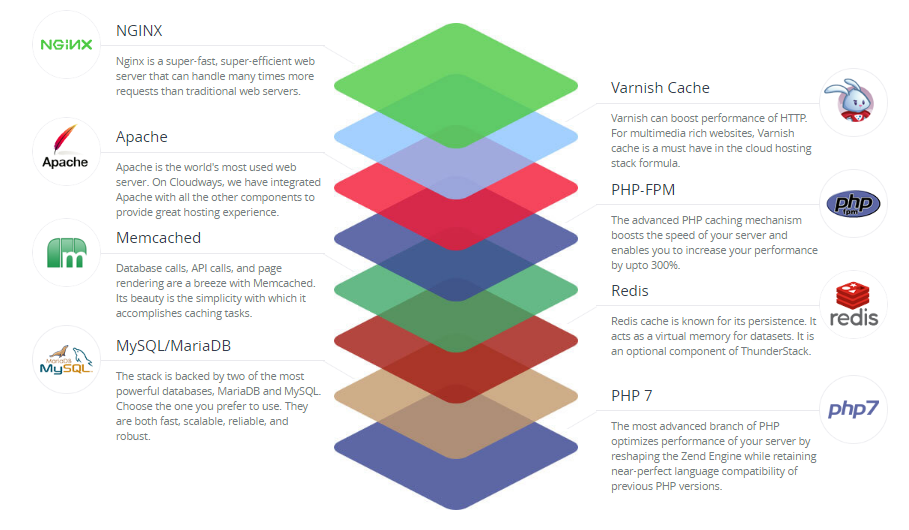
To provide a blazing fast speed and a glitch-free performance, Cloudways has built a PHP stack, known as ThunderStack. This stack consists of technologies that offer maximum uptime and page load speed to all PHP applications. Check out the following visual representation of ThunderStack and the constituent technologies:


alt_text


As you can see, ThunderStack comprises of a mix of static and dynamic caches with two web servers, Nginx and Apache. This combination ensures the ultimate experience for the users and visitors of your application.


Frameworks and CMS


The strength and popularity of PHP lies in the variety of frameworks and CMS it offers to the developers. Realizing this diversity, Cloudways offers a hassle-free installation of major PHP frameworks including Symfony, Laravel, CakePHP, Zend, and Codeigniter. Similarly, popular CMS such as WordPress, Bolt, Craft, October, Couch, and Coaster CMS - you can install these with the 1-click option. The best part is that if you have a framework or CMS that is not on the list, you can easily install it through Composer.


1-Click PHP Server & Application Installation


Setting up a stack on an unmanaged VPS could take an entire day!

When you opt for Cloudways managed cloud hosting, the entire process of setting up the server, installation of core PHP files and then the setup of the required framework is over in a matter of minutes.

Just sign up at Cloudways, choose your desired cloud provider, and select the PHP stack application.


alt_text


As you can see, your LAMP stack is ready for business in minutes.

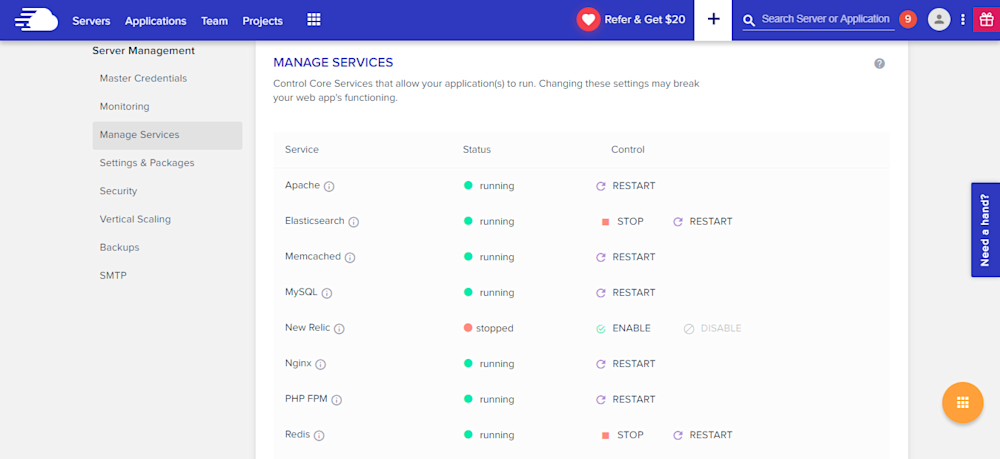
Many PHP applications fail because essential services are either turned off or not set up properly. Cloudways offers a centralized location where you can view and set the status of all essential services such as:


* Apache
* Elasticsearch
* Memcached
* MySQL
* PHP-FPM
* Nginx
* New Relic
* Redis
* Varnish


alt_text


Similarly, you can manage SMTP add-ons without any fuss.


Staging Environment


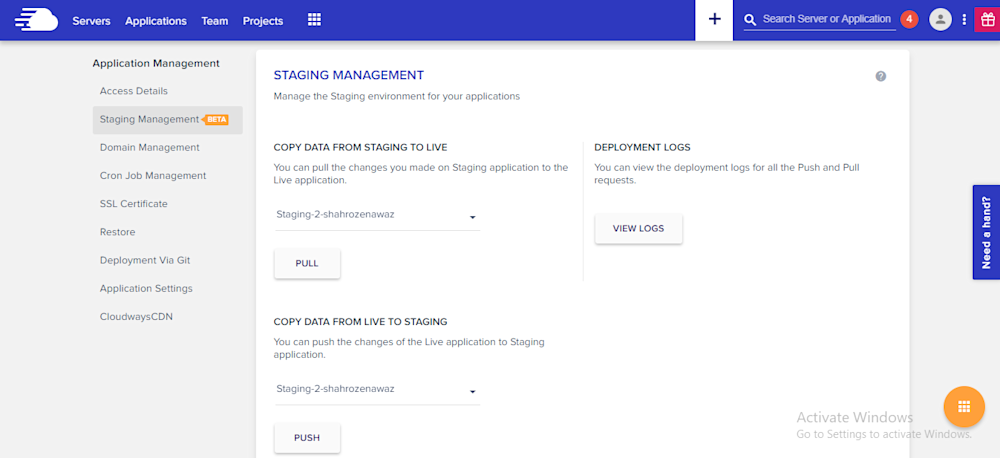
With Cloudways, you can test your web applications for possible bugs and errors before taking it live.

Using the staging feature, developers can first deploy their web sites on test domains where they can analyze the applications performance and potential problems. This helps site administrators to fix those issues timely and view the application performance in real-time.

A default sub domain comes pre-installed with the newly launched application, making it easy for the administrators to test the applications on those testing subdomains. Overall, it's a great feature which helps developers know about the possible errors that may arise during the live deployment.

alt_text

Pre-Installed Composer & Git


PHP development requires working with external libraries and packages. Suppose you are working with Laravel and you need to install an external package. Since Composer has become the standard way of installing packages, it comes preinstalled on the Cloudways platform. Just launch the application and start using Composer in your project.

Similarly, if you are familiar with Git and maintain your project on GitHub or BitBucket, you don’t need to worry about Git installation. Git also comes pre-configured on Cloudways. You can start running commands right after application launch.


Cloudways MySQL Manager


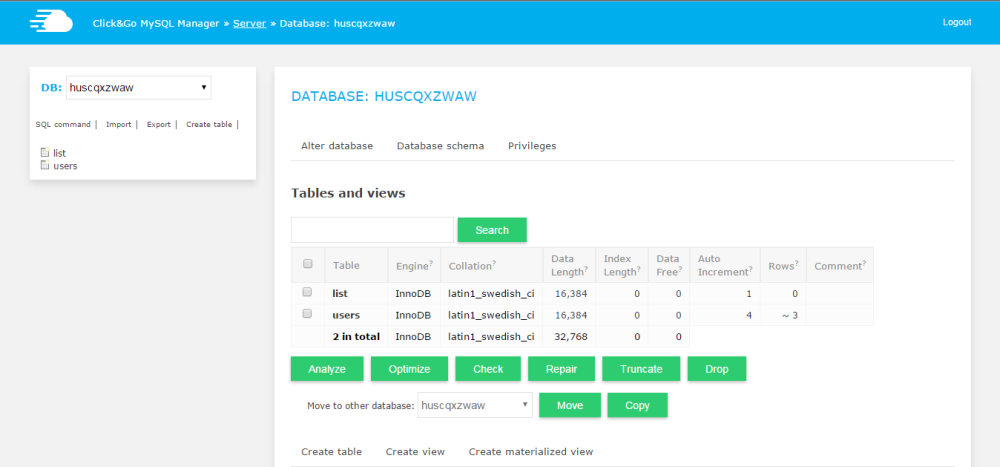
When you work with databases in PHP, you need a database manager. On the Cloudways platform, you will get a custom-built MySQL manager, in which you can perform all the tasks of a typical DB manager.

alt_text


However, if you wish to install and use another database manager like PHPMyAdmin, you can install it by following this simple guide on installing PHPMyadmin.


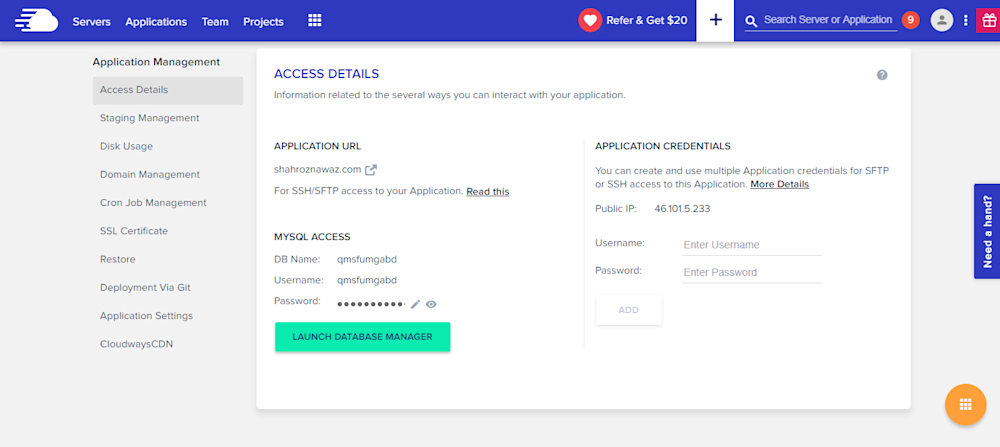
Server & Application Level SSH


If you use Linux, you typically use SSH for accessing the server(s) and individual applications. A third-party developer requires application and server level access as per the requirements of the client. Cloudways offers SSH access to fit the requirements of the client and users.

alt_text


PHP-FPM, Varnish & Cron Settings


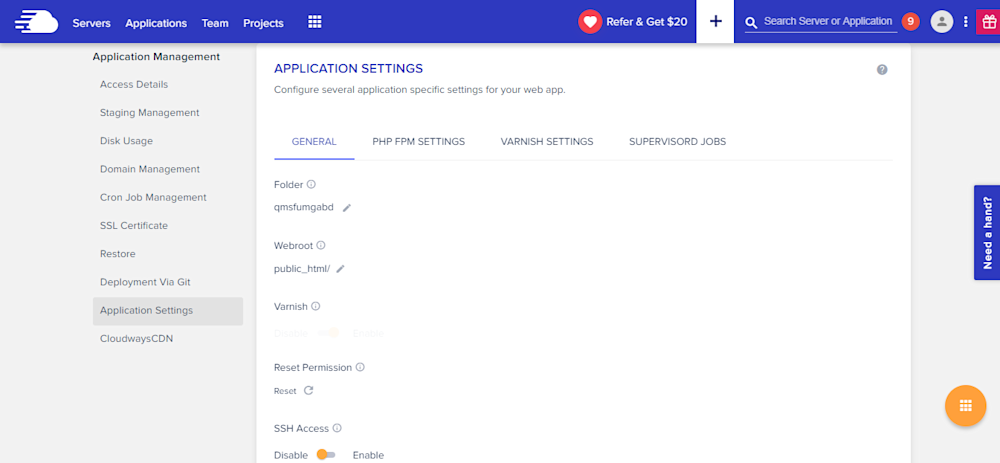
Cloudways provides custom UI panel to set and maintain PHP-FPM and Varnish settings. Although the default configuration is already in place, you can easily change all the settings to suit your own, particular development related requirements. In Varnish settings, you can define URL that you want to exclude from caching. You can also set permissions in this panel.

alt_text


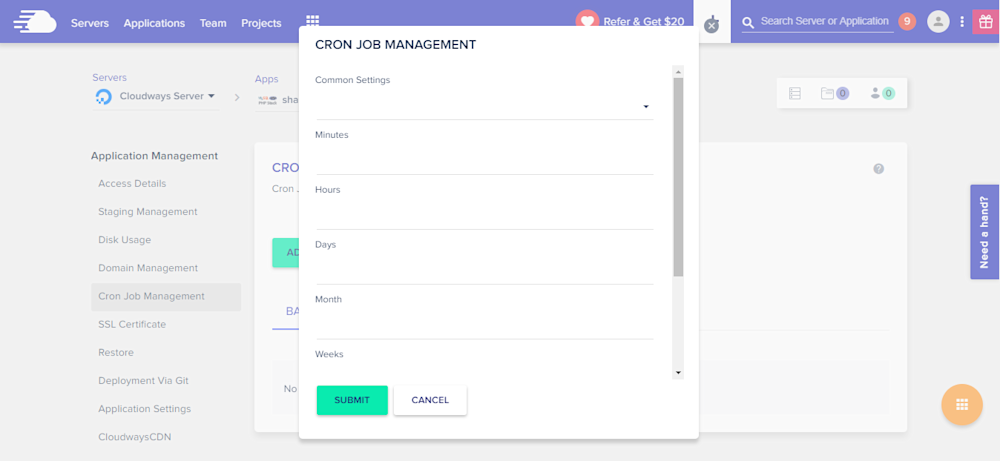
Cron job is a very commonly used component of PHP application development process. On Cloudways platform, you can easily set up Cron jobs in just a few clicks. Just declare the PHP script URL and the time when the script will run.

alt_text


Cloudways API & Personal Assistant Bot


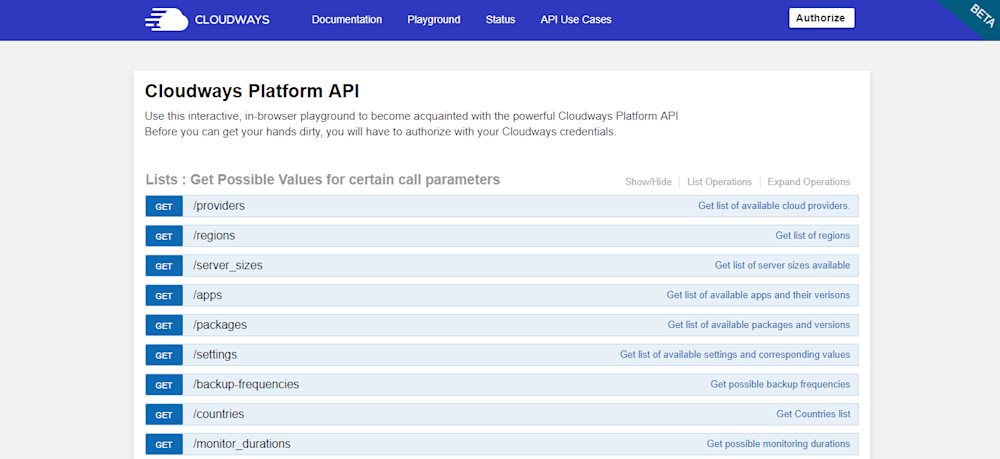
Cloudways provides an internal API that offers all important aspects of the server and application management. Through Cloudways API, you can easily develop, integrate, automate, and manage your servers and web apps on Cloudways Platform using the RESTful API. Check out some of the use cases developed using Cloudways API. You just need your API key and email for authentication of the HTTP calls on API Playground and custom applications.

alt_text


Cloudways employs a smart assistant named CloudwaysBot to notify all users about server and application level issues. CloudwaysBot sends the notifications on pre-approved channels including email, Slack and popular task management tools such as Asana and Trello.


Run Your APIs on PHP Stack


Do you have your own API which you want to run on the PHP stack? No problem, because you can do that, too with Cloudways! You can also use REST API like Slim, Silex, Lumen, and others. You can use APIs to speed up performance and require fast servers with lots of resources. So, if you think that your API response time is getting slower due to the large number of requests, you can easily scale your server(s) with a click to address the situation.


Team Collaboration


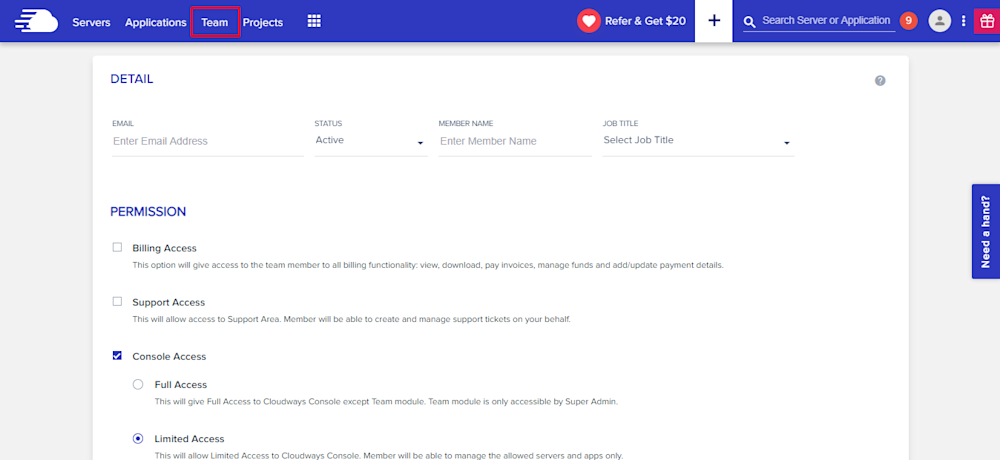
When you work on a large number of applications with multiple developers, you need to assign them on any specific application. Cloudways provides an awesome feature of team collaboration through which you can assign developers to specific application and give access to them. You can use this tool to assign one developer to multiple applications. Through team feature, you can connect the team together and work on single platform. Access can be of different type; i.e. billing, support and console. You can either give the full access or a limited one by selecting the features in Team tab.

alt_text


Final Words


Managed cloud hosting ensures that you are not bothered by any hosting or server related issues. For practical purposes, this means that developers can concentrate on writing awesome code without worrying about underlying infrastructure and hosting related issues. Do sign up and check out Cloudways for the best and the most cost-effective cloud hosting solution for your next PHP project!
12846 views · 6 years ago


Welcome back! If you’re new to this series have a look at Part 1 here


Today’s focus is on templating, the aesthetic that will make or break your web application.

Having a clean design with well defined CSS that’s responsive and user friendly goes a long way.

Developers often stick to their lane but delving into templating will bode in your favor, you can indeed
create a functional and launch-worthy application all on your own!

Let’s jump into it!

Structured structure


Everything you tackle should be found with ease down the line. Therefore careful planning is fundamental to the success and sustainability of your project. You’ll also find that clearly defining your work lends itself to more productivity overall as you spend less that explaining your work during a handover / looking for a specific piece of code or resource. You’ll probably end up spending more time on actual work.
Finding your own unique pattern with file structure and CSS identifiers will also work in your favor as something unique to your process will most likely be easier to remember and form a tactile relationship with.

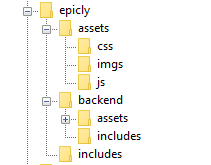
Our project’s current structure looks like this:


>If you need to backtrack, Part 1 is a great place to start!

In part 1, we created our index.php which displays info from our database.

Let’s take this a step further and create a header and a footer for our index.php

Create a file called header.php and save this to your includes folder.

Next, create a file called footer.php and save this to your includes folder.

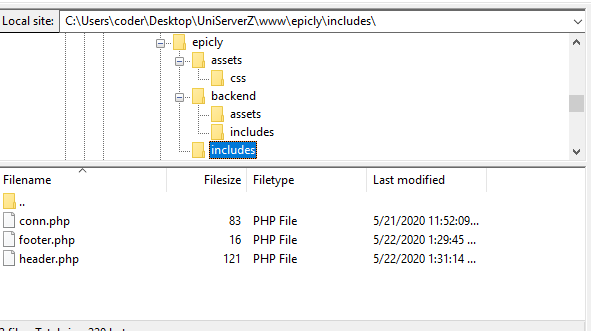
Your file structure should now look like this.


A header above all the rest


The header file will be a file we reuse throughout your web application. This file will contain important information that’s vital to the functionality and aesthetic of your website.
The type of info you’ll expect to see in a header.php file:
Script includes
Such as JQuery and important libraries
CSS includes
CSS files loaded from internal or external sources
Meta information
Contains important information that’s readable by search engines.
The basic structure of the beginning of your app, including your menu, and your logo.
For now, how header is going to have a basic layout.

Let’s get our HTML on!

<html>
<head>
<title>My Awesome CMS – Page Title</title>
</head>
<body>


A footer that sets the bar

Create a file called footer.php and save it to your includes folder (yourcms/includes/footer.php).

Add this code to your new file.

</body>
</html>


Next, let’s focus on the gravy… The CSS


CSS, when written beautifully, can truly set you apart.

You can tell your web application to load various styles to specific elements by defining unique identifiers.
Styles that are only used once are denoted with a # (a CSS “ID”) whereas styles that are reused multiple times are denoted with a . (a CSS “class”)

The best way to delve into the realm of CSS is to learn by experience.

Let’s create!


First, we need to create and load our CSS file. Remember our nifty new pal header.php? This created a convenient way to load our CSS file!

Add the following code to your header.php just above the </head> tag.

<link href=”../assets/css/style.css” type=”text/css” rel=”stylesheet”/> 


The ../ in the link to our stylesheet means we have to leave the current directory (the directory that header.php is in) and look for the assets/css/ directories.

Go ahead and create the css folder under your assets folder.

Next we’re going to create some simple CSS to test things out.

It’s time to add some style!


We are going to create two divs.
A div is a divider / section in HTML.
Add this to your index.php (located in your CMS’ root folder) above the <?php tag.

<div id="myfirstid"></div>
<div class="myfirstclass"></div>


Then, create a CSS file

Add this:

#myfirstid{
Background:lightblue;
Font-family:Arial;
Font-size:44px;
Font-weight: Bold;
}
.myfirstclass{
Font-size:15px;
Color: darkblue;
}


Save your newly created CSS to assets/css/ as style.css.

Pulling it all together, let’s see what we can do!


Let’s apply what we just learned to our index.php. But first, we should add our header.php and footer.php files.

Including everyone


Add this to the top of your index.php file:

include(‘includes/header.php’);


Remove the <divs> we used for practice earlier, we have something better in store!

Add this to the bottom of your index.php:

include(‘includes/footer.php’);


Next, let’s modify our code so we can add some style to the data we retrieve from our database.

Modify the following line:
foreach($getmydata as $mydata){ echo "Title: "; echo $mydata['title']; echo "<br/>"; echo "Content: "; echo $mydata['content']; echo "<br/>"; echo "Author: "; echo $mydata['author']; echo "<br/>"; echo "<br/>";


as follows:
?>

<div id=”myfirstid”>
<?php
foreach($getmydata as $mydata){
echo "<div class=”myfirstclass”>Title: ";
echo $mydata['title'];
echo "<br/>";
echo "Content: ";
echo $mydata['content'];
echo "<br/>";
echo "Author: ";
echo $mydata['author'];
echo "</div><br/><br/>";
}?>
</div>
<?php


Your full index.php should now look like this:

<?php
include('includes/header.php');
include('includes/conn.php');

if ($letsconnect -> connect_errno) { echo "Error " . $letsconnect -> connect_error;

}else{

$getmydata=$letsconnect -> query("SELECT * FROM content");

?>
<div id="myfirstid">
<?php
foreach($getmydata as $mydata){
echo "<div class=”myfirstclass”>Title: ";
echo $mydata['title'];
echo "<br/>";
echo "Content: ";
echo $mydata['content'];
echo "<br/>";
echo "Author: ";
echo $mydata['author'];
echo "</div><br/><br/>";
}
?>
</div>
<?php
}

$letsconnect -> close();
include('includes/footer.php');
?>


Go ahead, test it out!

There’s a lot to unpack and I will break things down a little more during our next tutorial!

Challenge


Study the final index.php and try to form a few theories about why closing a php tag is necessary before adding raw html.

Next Up: #CodeWithMe Part 4: Building A Good Base

8944 views · 5 years ago
Top 12 PHP Libraries to Leverage Your Web App Development


PHP, by all means, is an immensely powerful language!


We may fall short of words, but there won't come any end to its qualities. The endless functionalities and possibilities of this server-side scripting language have managed to get it a strong and supportive community of PHP programmers on a global level. At present, PHP powers more than half on websites and applications on the internet.


Do you know what makes PHP so praiseworthy?


It is the simplicity, easy programming structure, and developer-friendly web functionalities that are to be credited to turn PHP into one of the top programming languages. You can create highly interactive and dynamic websites and applications with desired results by making use of PHP.


However, coding often could be a tough and tedious task to accomplish. As a solution to this, you get built-in PHP libraries that optimize the process of coding for maximum productivity.


But what are these libraries?


That's exactly what you will find out as you move ahead in this article, a list of top 12 PHP libraries capable of leading the development process in an intended manner.


So, without waiting any further, let's move ahead to learn about PHP libraries in-depth.


PChart


PChart is a PHP library assisting with the generation of text data in the form of something more appealing to the eyes and known as visual charts.


You can use this library to represent data as bar charts, pie charts, and many more different formats. The PHP script here utilizes SQL queries to put data in the impressive charts or graphs form.


Mink


Another well-known in the list of PHP libraries is Mink. It allows you to keep an eye on if a proper interaction is happening between your web apps and the browser. Eliminating the API differences between the two types of browser emulators, Mink offers an authentic testing environment for you. It also supports PHPUnit, Behat, and Symfony2.


Monolog


Monolog is a PHP logging library that helps you with saving logs to the specified locations by sending them to set files, sockets, inboxes, databases, or other web services. The use of the PSR-3 interface permits to type-hint logs in counter to your libraries that maintain optimum interoperability.


Hoa


This modular, extensible, and structured set of PHP libraries we know as Hoa establishes a link between the research and the industry.


It recommends essential paradigms, mechanisms, and algorithms for building the reliability of a site. Many PHP developers in different parts of the world use Hoa for ideal PHP development.


Guzzle


Guzzle is an HTTP client library for PHP that enables you to send HTTP requests to combine with web services.


It offers a simple interface that makes the development of query strings, POST requests, HTTP cookies, and many other attributes possible. You can also use Guzzle to send synchronous and asynchronous requests from the similar interface.


Ratchet


If your need is to develop real-time, two-directional apps between clients and servers over WebSockets, Ratchet is the PHP library you need to do it effectively.


Creating event-driven apps with Ratchet is a rapid, simple, and easy job to do!


Geocoder


Geocoder is a library to create applications that are very well geo-aware.


With Geocoder, there is an abstraction layer that helps with geocoding manipulations.


It is further split into two parts, known as HttpAdapter and Provider.


ImageWorkshop


ImageWorkshop is an open-source PHP library letting you work over the manipulation of images with layers. You can crop, resize, add watermarks, create thumbnails, and so much more. You can also enhance the images on the sites.


PhpThumb


phpThumb is the library specialized at handling the work associated with creating thumbnails with minimal coding. Accepting every image source type and image formats, it makes you do a lot ranging from rotating or cropping to watermarking or defining the image quality.


Parody


This simple library we know as Parody is used to copy classes and objects. It also provides results for method calls, acquiring properties, instantiating objects, and more. Sequential method chaining is used by Parody to produce defining class structures.


Imagine


This object-oriented PHP library is meant for working with images along with manipulating them. The often adopted operations such as resizing, cropping, and applying filters happen instantly and relatively well with Imagine.


With Imagine, you get a color class that forms the RGB values of any given color. Draw shapes like arc, ellipse, line, etc. with the features available.


PhpFastCache


PhpFastCache is an open-source PHP library that makes caching feasible. Coming as a single-file, it can be integrated within a matter of minutes.


Caching methods supported by PhpFastCache involve apc, memcache, memcached, wincache, pdo, and mpdo.


The Bottom Line


It's not about what extra difference these libraries make; it's about what significant individual contributions these libraries make for a final desired PHP app or website.


A PHP programmer, too, agrees with these libraries' benefits.


It's your time now to try and believe!
67534 views · 2 years ago


To bridge the gap between web-based and cloud-based applications, businesses often rely on skilled DevOps developers. These professionals play a crucial role in ensuring seamless integration, efficient customization, and robust back-end infrastructure for applications. The expertise of DevOps developers is indispensable for optimizing development workflows and enhancing collaboration between development and operations teams in the dynamic landscape of app development services.

In the realm of cloud computing, web based application in cloud computing play a pivotal role. Technically, web apps, as the name suggests, are applications hosted on remote servers & accessible through web browsers. On the other hand, cloud-based apps are web applications that come with advanced functionalities & elaborate compatibility.


In the realm of contemporary software development, the demand for innovative solutions is evident in the competition between web and cloud-based applications. These two platforms share similarities but diverge significantly in crucial aspects. This article will delve into the distinctions between web-based and cloud-based applications, exploring facets such as back-end infrastructure, scalability, and technical perspectives, shedding light on the nuances that developers navigate in this dynamic landscape, including the pivotal role of technologies like chatbot development.
What Is a Web Application?

A web-based app is an application designed and developed for the web browser. Unlike cloud based application development, the web app completely depends on the web server for functionality & processing. This application program is mainly stored on the remote server & delivered through a web browser interface over the internet. According to web application development company, web apps have client-server architecture & their codes are divided into 2 major components – server-side architecture & client-side architecture.

Server-side architecture: The server-side architecture or script usually deals with data processing. The web server can process a client request & send a response back. This web app architecture defines a simultaneous interaction between database instances, components, user interfaces, middleware systems, and servers.

Client-side architecture: The client-side architecture mainly deals with interface functionalities such as drop-down boxes and buttons. When a user clicks on the link, the browser will start loading the client-side script & rendering a text and graphic element for interaction.
Types of Web Apps
Nowadays, many businesses are already adopting various kinds of web-based applications because of their several advantages, features, and functionalities. 8 most popular types of web apps include:
    . Static Web Apps
Static web applications, constructed using HTML, CSS, and JavaScript, lack the flexibility of dynamic counterparts. These web based services provide content directly to users without requiring server-side modifications, resulting in simplicity and straightforward development. Key benefits of these apps include:
Very fast load time
Highly secure
Less complex to build
    . Dynamic Web Apps
This is a complex type that provides real-time data based on the server response and the user’s request. Dynamic web apps can be developed either as a conventional website with several pages and levels of navigation or as a single-page web application. They use several server-side and client-side languages to create web pages such as HTML, CSS, JavaScript, Python, PHP, Ruby, etc. Key benefits of dynamic web apps include:
Wider audience reach
Scalable in comparison to static web apps
Very flexible in terms of a new content update
    . Single Page Apps
A single page web app entirely runs on the browser & never requires browser reloading. This is actually a dynamic web app that manages all data on a single HTML page. This type of web app is faster than traditional websites as its logic is implemented in the browser directly than a server. Gmail, Netflix, Pinterest & Paypal are the best examples of single page applications. Key benefits include:
Enhanced user experience
Minimized server load
Improved app performance
    . Multiple-Page Apps
Multiple page apps are designed multiple pages separately and combined to form a website. They have different pages with static information like texts & images. Web based app development companies recommend using multiple-page apps as they offer excellent control over search engine optimization techniques. Major benefits of Multiple page apps include:
Ideal for SEO
Quick browser back or forward navigation
Simple to develop
    . Animated Web Apps
This is a type of web application that effectively supports synchronization & animation on the web platform. These applications are widely used by freelancers and creative companies to present their creativity better. Technically, JavaScript, HTML5, FLASH, and CSS are used to create animated web applications. Key benefits of AWAs include
Improved User Engagement
Enhanced Navigation
Excellent Branding
    . Web Apps with CMS
In this web application, content is updated constantly. It helps to manage, modify and create digital content with ease. WordPress is one of the best examples of CMS web applications. A variety of languages are used to create content management systems such as C#, PHP, Java, and Python. Key advantages of CMS web apps include:
Quick content creation & management
Efficient & quick updates
A vast range of features
    . E-commerce Web Apps
It’s a complicated and advanced dynamic web application that allows users to buy & sell goods electronically. These web based services encompass transaction and payment integration as key components, facilitating seamless order processing, payment acceptance, and logistical management for businesses involved in online commerce. Key benefits of these web apps include:
Scale business quickly
Offers customer insights through tracking & analytics
Sell goods across the world
    . Progressive Web Apps
Progressive web apps or PWAs are also called cross-platform web apps usually built with HTML, CSS, & JavaScript. PWAs use different features, APIs, and progressive methods to deliver a seamless experience. Progressive web apps boost the adaptability and speed of web applications. These apps are still easy to access if internet connectivity is poor. Key benefits of progressive web apps include:
Fast loading time
No installation required
Quickly respond to user interactions
Enhanced cross-platform conversion

Looking for App Development Solutions?
Take your brand up a notch with our custom mobile app development services.
Talk to an Expert

Type
Widely Used In
Advantages
Dynamic web apps
Social media
Healthcare
IT Industry
Logistics and transportations
Retail and ecommerce sectors
On-demand
Directly manage websites to update & change the information
Quick user management to protect servers & control all website users
Static web apps
Book publishing sectors
Works in offline mode
No 3rd party software installation required to access web apps
Single page apps
Email service
Communication sectors
Allows navigation & optimized routing experience
Keeps visual structure of web apps consistently through presentation logic
Multiple page apps
E-commerce sectors
Enterprise industries
Enables optimizing every page for the search engine
Allows users to access other pages
Animated web apps
Animation
Education
Gaming industries
Hold user attention for a very long time due to its attractive approach & unique design
Aspect ratios, landscape orientations, portrait, and viewing distances & different pixel densities are considered
Web apps with CMS
Blogging platforms
Sales & marketing platform
News portals
Easily organizes the web content Offers group & user functionality
Simple language support & integration
E-commerce web apps
E-commerce sectors
Allows sellers to sell products using a single platform
Helps you expand business globally & reach maximum audience
Progressive Web Apps
On-demand
Healthcare
Retail and e-commerce
Logistics and transportations
Social media
IT sectors
Responsive & Browser Compatibility Works in online & offline mode
Updates with no user interaction

Key Benefits of Web Apps
Web apps enable businesses to interact with their customers more efficiently. These applications can make it easy to track & measure data that are essential to keep business operations streamlined. Key advantages of web apps include:
Easily accessible through any kind of web browser
Runs on multiple platforms that make it cross-platform compatible
Minimizes the risk of compatibility issues
Requires less maintenance & support from the developer’s end
Helps to ease usability for the customers
Effectively eliminates hard drive space limitations
Apps can be maintained & updated without software reinstallation on several devices
Offers high scalability and flexibility
Simple to deploy, maintain, and update
The cost of routine maintenance is minimized as the data is stored on remote servers
What is a Cloud Based App?
These apps are online software programs with elements accessible via a local server and executed on the cloud environment. As internet-based software, cloud applications are stored in the remote data center & handled by cloud-service providers. These apps are used for file sharing & storage, order entry, word processing, inventory management, financial accounting, customer relationship management, data collection, etc.

According to the report, the global market size of cloud apps is projected to reach approx 168.6 billion USD by 2025. Cloud apps usually support several user requirements through customization and provide several services to meet storage, backup & security needs. Some major characteristics of cloud apps include:
Agile application
Microservices-oriented
API-backed
Continuously integrated & delivered
DevOps-enabled
Analytics-infused
User experience-centric
Types of Cloud-based Applications
Cloud apps are divided into three major cloud computing models – SaaS, PaaS, and IaaS. Each model also shows several parts of cloud computing stacks. Take a closer look at these types:
    . SaaS or Software as a Service
SaaS is one of the best cloud apps that enable users to easily access full-functioning software applications over the internet. These cloud applications are primarily designed for freelance services, large enterprises & SMBs. Some of the best examples of SaaS applications are HubSpot CRM, Wrike, MS Office 365, Sisense, Wix, etc.
    . PaaS or Platform as a Service
PaaS provides users with the infrastructure, computing platforms, and solutions to build their own applications. Platform as a Service is ideal for businesses that mainly engage in collaboration, testing, and development of cloud solutions. PaaS applications have a deployment environment including run-time system libraries, operating systems, and graphic UI. Some of the best examples of PaaS apps are Google App Engine, Microsoft Azure, Rackspace Cloud Sites, etc.
    . IaaS or Infrastructure as a Service
IaaS consists of basic building blocks that offer access to networking functionalities, features & data storage space. It enables users to outsource IT infrastructures like servers, processing, virtual machines, storage, networking & other resources. IaaS applications also offer a good level of management control and flexibility over IT resources. Some of the best examples of IaaS apps are Amazon WorkSpaces, IBM Cloud, Google Cloud, etc.
Benefits of Cloud Apps
Web based application in cloud computing boost productivity, accessibility, security, and data safety. They help businesses make the process of collaboration more effective and easier. Key benefits of cloud applications include:
Minimal service provider interaction & management effort
Provides large computing capabilities, online & offline
Provides access to information from any device or place
Offers fast access to important applications through cloud servers
The performance of the availability of cloud apps enhances profitability & streamlines workflows
Serves multiple consumers with virtual and physical needs
Provides high transparency to resource providers & consumers
Offers improved collaboration options
Web Apps Vs Cloud Apps – Key Differences
Web apps and cloud apps both come with a wide range of functionalities & have noticeable distinctions. Web-based applications usually are accessible via web browsers, whereas cloud app’s infrastructure and data aren’t only accessible through the web browser but also downloadable. So, all cloud apps are web apps with additional features. Other differences between web and cloud apps are listed below.

Parameters
Cloud apps
Web apps
Internet
Work partially or entirely without the internet connectivity
Work with the internet only
Security
Ensures high security measures for sensitive & confidential information
It can verify client info on authentic servers
Technology
It needs a back–end framework & a JavaScript-based structure like React Js, Angular, etc
It has inbuilt languages such as PHP, Python & Ruby, and databases like MySQL.
Access
It’s not dependent on the web browser
Accessed via the web browser only
Customization
Customization features improve functionalities.
Never provides customization and similar functionalities
Costs
Expensive as compared to web apps
Development cost is less than cloud apps
Types
SaaS, PaaS, IaaS, RaaS
Static web apps, dynamic web apps portal web apps, etc
Scalability
Inherently scalable
Limited scalability
Availability
High uptime
Limited uptime
Storage
Multiple replicated center
Single data center

Are You In Search of The Best App Development Company?
With top-notch development services, we develop the best software applications that meet your needs.
Book an Appointment
Final Words
Web apps and cloud apps both are continuing to deliver users as the most crucial touch point. Since they are packed with similarities and dissimilarities in terms of software architecture, storage, and other aspects, selecting the right application always depends on customer preferences, business needs, and operations. Are you planning to build a custom web application or looking for web app development services? Get in touch with our experts for complete assistance.
9019 views · 2 years ago


In today's digital age, where data breaches and cyber attacks are increasingly prevalent, safeguarding sensitive information is paramount. Cryptography, the art of secure communication, plays a crucial role in ensuring data confidentiality, integrity, and authenticity. Implementing cryptography in PHP, one of the most widely used server-side scripting languages, offers a robust means to protect your data. In this guide, we'll explore how to utilize cryptography effectively in PHP to enhance the security of your applications.

Understanding Cryptography Basics


Before diving into PHP implementations, it's essential to grasp the fundamental concepts of cryptography. At its core, cryptography involves techniques for encrypting plaintext data into ciphertext to conceal its meaning from unauthorized parties. Key aspects of cryptography include:
   
. Encryption: The process of converting plaintext data into ciphertext using an algorithm and a secret key. This ciphertext can only be decrypted back to its original form using the appropriate decryption key.
   
. Decryption: The reverse process of encryption, where ciphertext is transformed back into plaintext using the decryption algorithm and the correct key.
   
. Symmetric Encryption: A type of encryption where the same key is used for both encryption and decryption. Examples include AES (Advanced Encryption Standard) and DES (Data Encryption Standard).
   
. Asymmetric Encryption: Also known as public-key cryptography, it involves a pair of keys: a public key for encryption and a private key for decryption. RSA and ECC (Elliptic Curve Cryptography) are common asymmetric encryption algorithms.

Implementing Cryptography in PHP


PHP provides robust cryptographic functions through its OpenSSL and Mcrypt extensions, allowing developers to implement various encryption techniques easily. Here's a step-by-step guide on how to perform common cryptographic operations in PHP:

1. Symmetric Encryption


<?php
$encryptionKey = openssl_random_pseudo_bytes(32);

$plaintext = "Sensitive data to encrypt";
$ciphertext = openssl_encrypt($plaintext, 'aes-256-cbc', $encryptionKey, 0, $iv);

$decryptedText = openssl_decrypt($ciphertext, 'aes-256-cbc', $encryptionKey, 0, $iv);

echo $decryptedText;
?>


2. Asymmetric Encryption


<?php
$config = array(
"digest_alg" => "sha512",
"private_key_bits" => 4096,
"private_key_type" => OPENSSL_KEYTYPE_RSA,
);
$keyPair = openssl_pkey_new($config);

openssl_pkey_export($keyPair, $privateKey);
$publicKey = openssl_pkey_get_details($keyPair)["key"];

$plaintext = "Confidential message";
openssl_public_encrypt($plaintext, $encrypted, $publicKey);

openssl_private_decrypt($encrypted, $decrypted, $privateKey);

echo $decrypted;
?>


Best Practices for Cryptography in PHP


While implementing cryptography in PHP, it's essential to adhere to best practices to ensure maximum security:
   
. Use Strong Algorithms: Always use widely recognized cryptographic algorithms like AES for symmetric encryption and RSA for asymmetric encryption.
   
. Key Management: Safeguard encryption keys carefully. Utilize secure key management practices, such as storing keys in secure vaults and rotating them regularly.
   
. Data Integrity: Implement mechanisms to verify data integrity, such as HMAC (Hash-based Message Authentication Code), to detect tampering attempts.
   
. Secure Communication: When transmitting encrypted data over networks, use secure protocols like HTTPS to prevent eavesdropping and man-in-the-middle attacks.
   
. Stay Updated: Keep PHP and cryptographic libraries up to date to patch any security vulnerabilities and ensure compatibility with the latest cryptographic standards.

By following these guidelines and leveraging the cryptographic capabilities of PHP, developers can strengthen the security posture of their applications and protect sensitive data from unauthorized access. Remember, effective cryptography is not just about encryption but also encompasses key management, integrity verification, and secure communication practices. With diligence and proper implementation, PHP can be a powerful tool for building secure and resilient systems in today's digital landscape.

SPONSORS

PHP Tutorials and Videos